
Fathom to CRM-Ready JSON: Structured Signals From Your Note-Taker
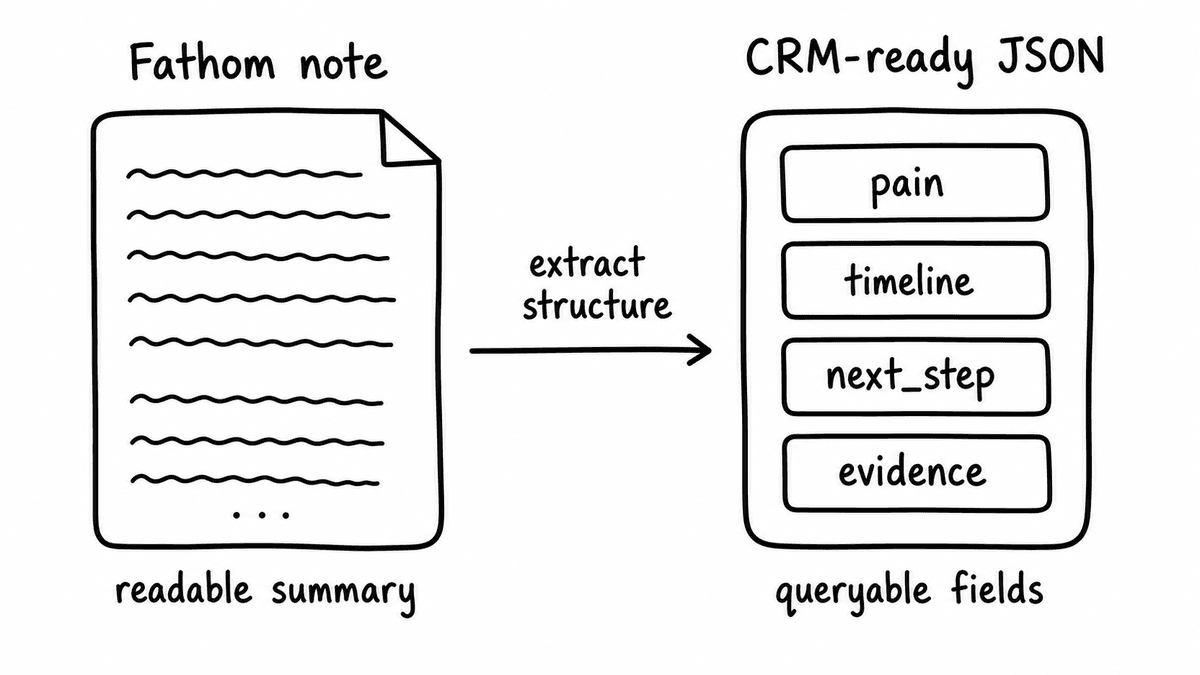
If you are searching for how to go from Fathom to CRM in a way that actually moves pipeline reporting, the answer isn’t another export button. Fathom records and transcribes your calls, writes a clean summary, and lists the action items, and that output is genuinely useful for a human reading back over a meeting. The problem starts the moment you want structured data from Fathom that a workflow can act on, because the summary that lands in a CRM note or a doc is readable but not queryable, and notes can’t drive routing, forecasting, or coaching on their own.
This guide covers the workflow to turn a Fathom transcript to JSON that a CRM can consume: what Fathom gives you and why it isn’t yet structured data, how to get the transcript out and send it to Semarize with a Kit, which fields are worth extracting, why a versioned Kit keeps those fields stable, and why the same pattern works whether the recording came from Fathom, Otter, tl;dv, Zoom, or Gong. Semarize sits after the note-taker as the structured-data layer, and it doesn’t replace Fathom for recording or summarising.
What Fathom gives you, and why it isn’t structured data
Fathom is a popular AI meeting note-taker that joins calls, records and transcribes them, and generates summaries and action items, and part of why it is so widely adopted is a generous free tier that puts a note-taker on almost every calendar. For the rep and the account team that is a real improvement over typing notes by hand, because the recording is captured, the transcript is searchable inside the tool, and the summary compresses an hour of conversation into something you can skim.
The three outputs Fathom produces are a transcript, a summary, and a list of action items, and all three are written for a person to read. Fathom transcripts are readable but not queryable: they contain every question the rep asked, every pain the buyer named, every competitor mentioned, and every reference to budget or timeline, but that signal is locked inside prose, so nothing downstream can filter on it. Summaries and action items are compressed prose too, and compressed notes attached to an opportunity can’t answer a structured question like “which open deals have a named economic buyer” or “which discovery calls agreed a dated next step”.
This is the gap that stops note-taker output driving RevOps workflows: pipeline reporting, lead routing, and coaching all need typed fields with fixed names and value types, and paragraphs in a notes field are none of those things. Whether the transcript sits in Fathom or gets copied into a CRM activity, it stays unstructured text until something reads it and returns a boolean, a score, a category, or an extracted string per criterion.
The workflow: Fathom transcript to CRM-ready JSON
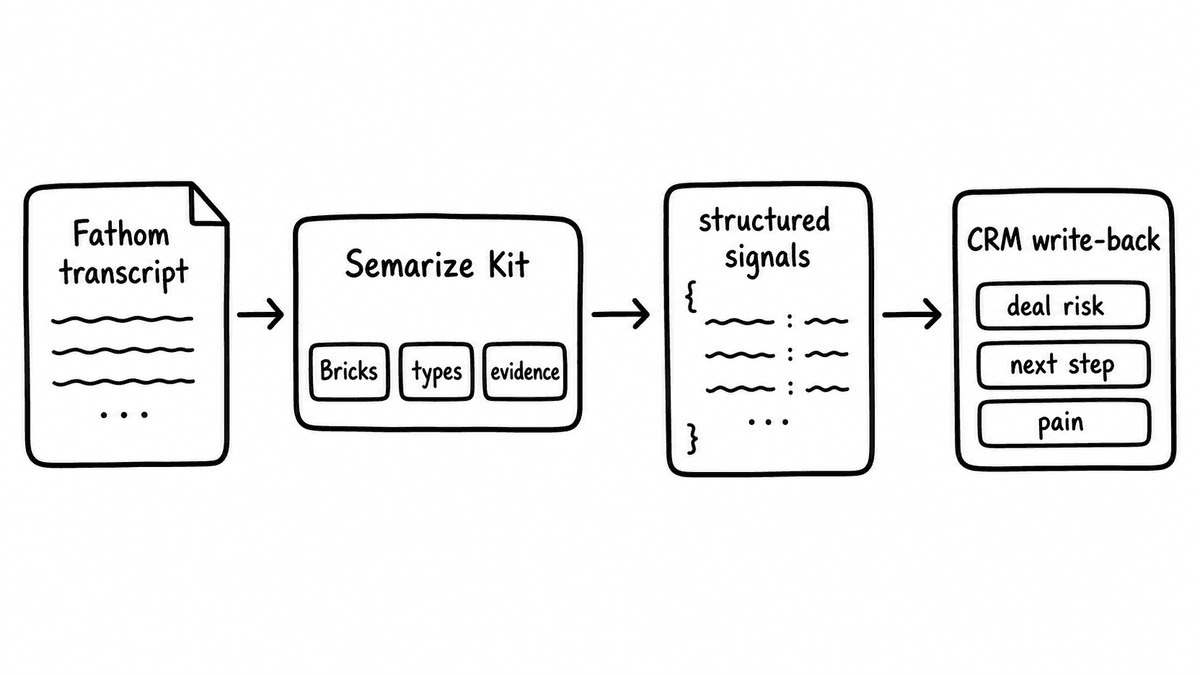
The pipeline has four steps: get the transcript out of Fathom, send it to Semarize with a Kit, receive one typed field per Brick, and write the validated output to the CRM opportunity and a warehouse table. Each step is a plain data move, and none of them requires the rep to change how they run the call.
Getting the transcript out of Fathom can be done by export from the Fathom interface for a one-off test, or programmatically where Fathom’s integrations or API make transcript content available; the current export and API options are worth confirming directly with Fathom, since the specifics change and vary by plan. For a production pipeline you want the transcript to arrive automatically after each call, so the usual pattern is an automation tool that picks up the finished transcript and passes the text onward, rather than a person copying and pasting.
The transcript text is then sent to the Semarize API with the ID of a Kit that defines the evaluation schema. The Kit is a versioned group of Bricks, and each Brick evaluates one criterion against the transcript and returns a typed value: a boolean Brick for “economic buyer named” returns true or false, a score Brick for “discovery quality” returns a number on a defined scale, a category Brick for “call disposition” returns one option from a fixed set, and a string extraction Brick for “competitor mentioned” returns the name or null. The call returns one JSON object with one typed field per Brick, usually within a few seconds.
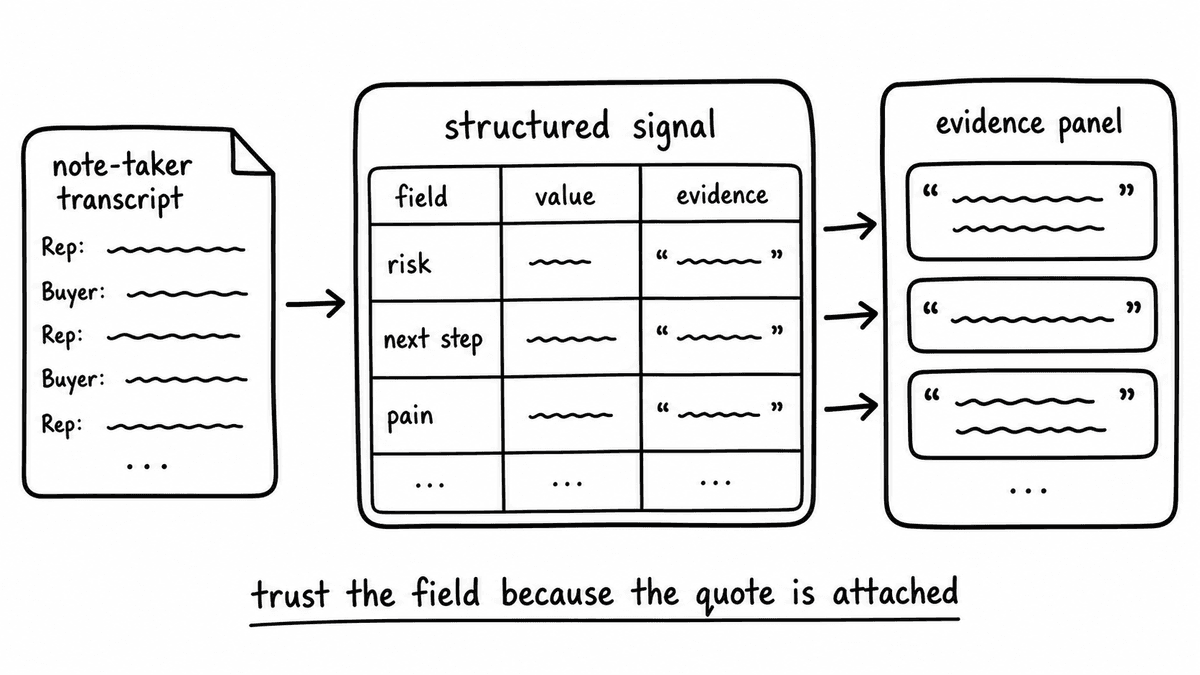
Before that JSON is written anywhere it’s validated against the expected schema, so a field that should be a number is a number and a category value is one of the allowed options, and any Brick that can’t find evidence returns null rather than a guess. The validated object carries the CRM opportunity or deal ID alongside the extracted fields, so writing it to the CRM is a look-up by ID and a field update, and the same object can be routed in parallel to a warehouse table so the analytical history lives next to the operational record.
Which fields are worth extracting from a Fathom call
The fields worth extracting are the buyer-stated facts that decide whether a deal is real, because those are the values a summary buries and a report needs. The most useful ones are the consequence the buyer named for not solving the problem, the timeline they gave for a decision, whether an economic buyer was identified, any competitor mentioned, and whether a committed next step with a date was agreed. Each of these becomes one typed field: consequence as an extracted string, timeline as a string or category, economic buyer identified as a boolean, competitor mentioned as an extracted string, and next step committed as a boolean with the date as a second field.
These are buyer-stated facts rather than rep opinions, which is what makes them defensible in a pipeline review, because the field records what the buyer actually said on the call instead of what the rep hoped or remembered to type. Extracting the qualification framework your team already uses is the natural extension of this, and the note-taker to enablement guide covers how the same extraction feeds coaching scores as well as pipeline fields. Start with the three or four fields that change a forecast conversation, and add to the schema once those are trusted.
Why a versioned Kit keeps the fields stable over time
Fields are only useful for reporting if they mean the same thing this quarter as they did last quarter, and that is what a versioned Kit protects. Once a Kit version is in production the field names, types, and allowed values are fixed, so the boolean for “economic buyer named” scores the same way across every Fathom call and the numbers stay comparable over time. When you want to change the evaluation logic you publish a new Kit version, which means the CRM mapping and the warehouse schema are never altered silently underneath a report.
Without version pinning the definitions drift, and drifting definitions quietly break trend lines, because a discovery score that meant one thing in March and something looser in June can’t be charted as a single series. The version number travels with the output and can be stored as a column in the warehouse table, so historical scores can be read against the exact logic that produced them and a schema change becomes a labelled cut in the data rather than an invisible one.
The pattern is source-agnostic
Nothing in this workflow is specific to Fathom, because Semarize consumes transcript text and returns typed JSON regardless of what produced the text. The same discovery Kit applied to a Fathom transcript, an Otter transcript, a tl;dv transcript, a Zoom transcript, or a Gong transcript evaluates the same criteria and returns the same field types, so teams that mix note-takers across the org still get one comparable schema instead of a different shape of data per tool.
That matters because most companies don’t standardise on a single recorder: one team lives in Fathom on the free tier, another is on Zoom, and enterprise deals run through Gong, and without a shared extraction layer each source produces its own incompatible notes. Pointing every transcript at the same Kit collapses that into one typed record per call, and the sales call transcripts to CRM-ready JSON guide covers the delivery side of that pattern in more detail. Fathom stays the recorder and summariser for the people who like its interface, and Semarize adds the structured-data layer that the reporting and automation actually run on.
Semarize turns Fathom transcripts into typed JSON that your CRM, warehouse, and RevOps automation can use directly, without replacing the note-taker your team already runs.
Common questions
Does Fathom have an API?
Fathom offers integrations and, on the relevant plans, API and export options for getting transcript and meeting data out of the tool, though the exact endpoints and availability depend on your plan and change over time, so it’s worth confirming the current options directly with Fathom. For this workflow the important point is that you can obtain the transcript text somehow, whether by export or via Fathom’s integrations or API. Once you have the transcript text, the structured-data step is the same regardless of how it was retrieved, because Semarize works from the text itself rather than from a Fathom-specific format.
How do I get structured data out of Fathom?
Fathom itself produces a transcript, a summary, and action items, all of which are prose written for a human to read rather than typed fields a workflow can query. To get structured data you add an extraction step after Fathom: get the transcript out by export or via Fathom’s integrations or API, send the text to the Semarize API with a Kit, and receive a JSON object with one typed field per evaluation criterion. Each field is a boolean, a score, a category, or an extracted string, which is what CRM reporting, routing, and coaching can act on.
Can I send Fathom call data to Salesforce or HubSpot as fields?
Yes. Once the Fathom transcript has been converted to typed JSON, writing it to Salesforce or HubSpot is a field update: look up the opportunity or deal by the CRM ID carried alongside the extracted values, then write each typed field to its matching field or property. Boolean fields map to checkboxes, score fields to number fields, and category fields to picklists, so when the Kit schema is designed to match the CRM object the write needs no transformation. The same JSON can be sent to a warehouse table in parallel so the analytical history sits next to the operational record.
Does this work with other note-takers like Otter or tl;dv?
Yes. The workflow is source-agnostic because Semarize consumes transcript text and returns typed JSON regardless of which tool produced the transcript. The same Kit applied to a Fathom, Otter, tl;dv, Zoom, or Gong transcript evaluates the same criteria and returns the same field types, so a team running several note-takers across different groups still gets one comparable schema rather than a different shape of data per tool. That’s what lets you report across every call in the same terms even when the recording tools differ by team or deal size.
Continue reading
Read more from Semarize
Conversational Intelligence API vs AI Note-Taker: What Changes?
AI note-takers produce prose summaries for humans to read. A conversational intelligence API produces structured data for systems to consume directly, and that difference determines what you can build.
CRM Enrichment From Sales Calls: The RevOps Data Ops Playbook
Most CRM enrichment stalls at 30% field coverage because the output is unstructured - reps updating from memory, summaries stored as notes. The fix is a structured extraction pipeline: transcript to consistent fields to CRM to automation triggers. This playbook covers the schema, the routing, and the implementation in Salesforce and HubSpot.
Turn Sales Call Transcripts Into CRM-Ready JSON: Schema, Extraction, Validation, and Scoring
The gap between a call transcript and a CRM opportunity record is a schema design problem. Define the fields, extract them from the transcript with typed criteria, validate the output, and write it to the CRM. Every source works. No rep data entry required.