
How to Extract Zoom Cloud Recording Transcripts via the Zoom API
The Zoom cloud recording transcript API isn’t a single endpoint you can call to get clean transcript text; it is a recordings listing endpoint, a recording_files array you have to filter, and a download step that needs its own authentication. The real job is not fetching a file, but turning the raw cloud recording into usable transcript text and then into structured signals your CRM and warehouse can act on, and every step before that last one is plumbing you have to build once and get right.
This guide covers how to download a Zoom recording transcript via the API end to end: the Server-to-Server OAuth app and scope you need, how to list recordings and read the file_type model, how to pull the transcript with a bearer token, and how to choose between webhook-driven and backfill ingestion. It closes on where the extracted transcript text becomes typed JSON, because a VTT file in cloud storage is still not something a pipeline report can query.
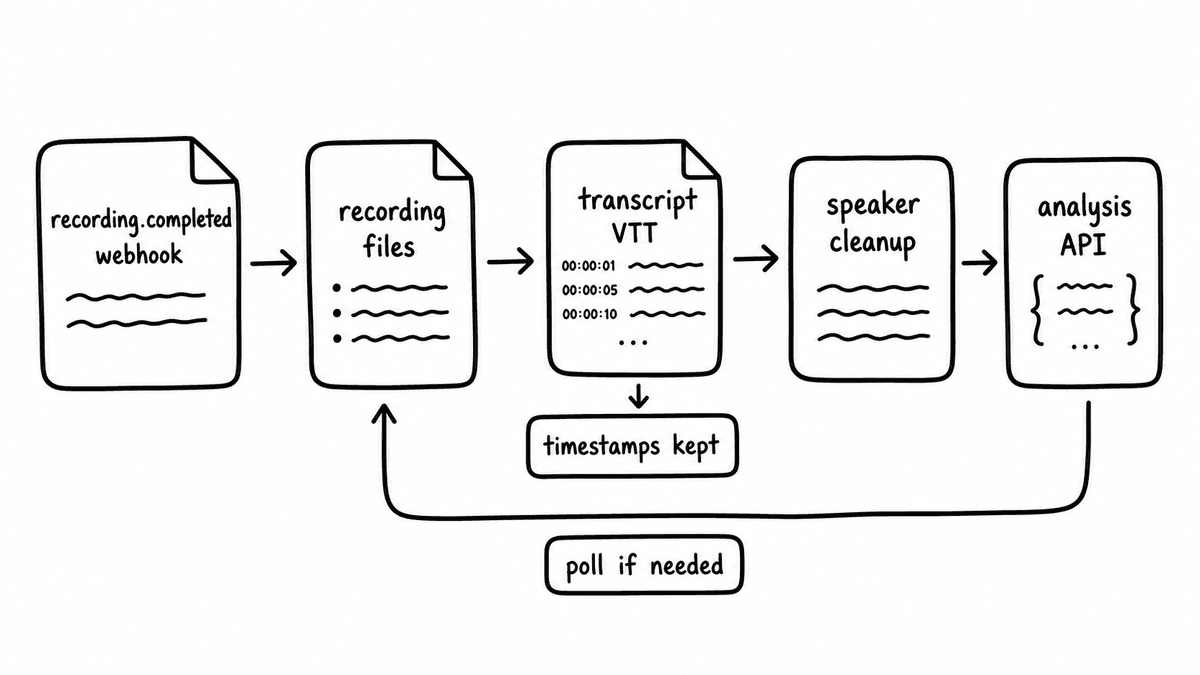
Why the transcript is buried in the recording API
Zoom cloud recordings expose several file types under one recording, and the transcript is only one of them. When a meeting is recorded to the cloud and finishes processing, Zoom produces an MP4 video file, an M4A audio file, and, where audio transcription is enabled on the account, a TRANSCRIPT file plus closed-caption files. There’s no dedicated “get the transcript” route: you list a user’s recordings or a specific meeting’s recordings, and each recording hands back an array of files where each entry carries a file type and a download URL. Extracting the transcript means walking that array, picking the right file type, and downloading it, which is why teams that expected one clean call end up building three steps.
Cloud recording has to be enabled on the account before any of this returns data, because local recordings never reach Zoom’s cloud and aren’t exposed through the recording API at all. That distinction matters during onboarding: accounts that record locally by default will show empty recording lists even when meetings clearly happened, and the fix is an account setting, not an API change.
Authentication and the cloud recording scope
Zoom’s API uses OAuth, and for a backend pipeline that runs on its own without a user clicking through a consent screen, the right pattern is a Server-to-Server OAuth app. That app issues a short-lived access token, which you then pass as a bearer token on the Authorization header of every request. The token is what proves the request is allowed to read recordings, and it’s also what the download step depends on, so the same credential covers both listing and fetching.
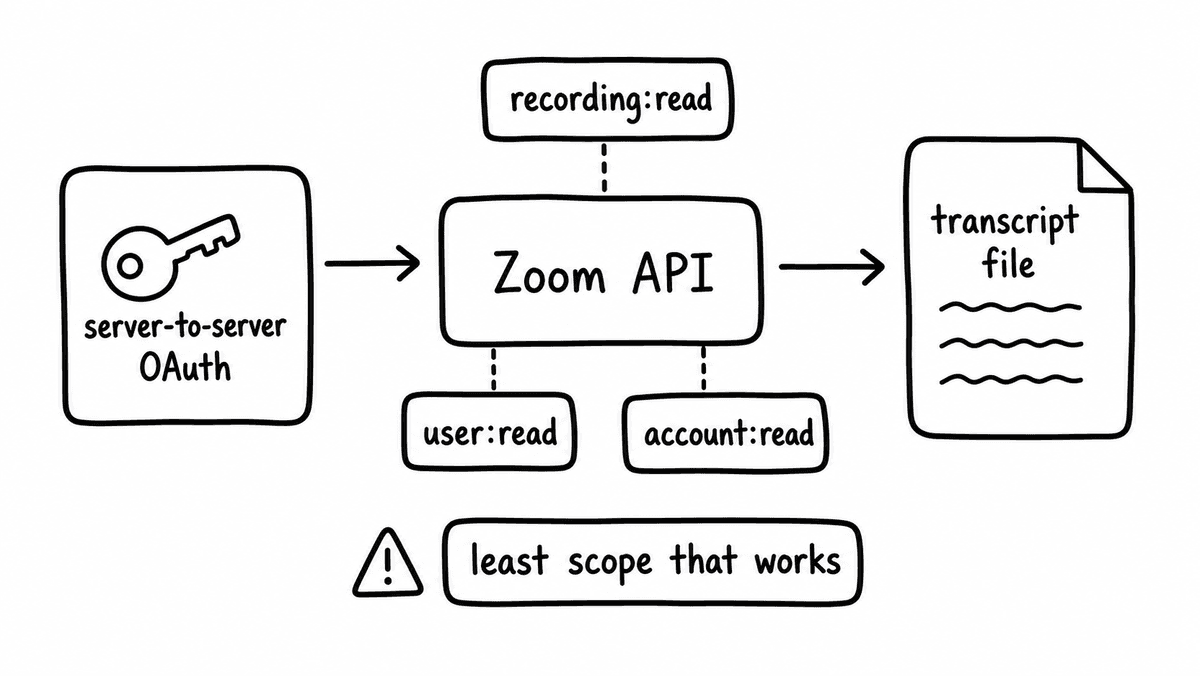
Reading cloud recordings requires the cloud recording read scope, granted to the app and recorded on the token. Admin-level access across an account’s users typically uses an admin-scoped variant such as cloud_recording:read:admin, which lets a single service credential enumerate recordings for many users rather than one account at a time. Getting the scope wrong is the most common first-run failure, because the access token issues successfully but the recordings endpoint returns an authorisation error the moment you ask for a user’s files.
Listing recordings and reading the file_type model
To find recordings you call GET /v2/users/{userId}/recordings, which returns the cloud recordings for one user and accepts a date range through from and to query parameters, with results paged through a next_page_token when a single response cannot hold them all. When you already have a specific meeting, GET /v2/meetings/{meetingId}/recordings returns the files for that meeting directly, which is the endpoint a webhook payload usually points you at.
Each recording carries a recording_files array, and each file in it has a file_type and a download_url. The file types you will see include MP4 for the video, M4A for the audio, TRANSCRIPT for the audio transcript, and closed-caption files such as CC or VTT. Extracting the transcript is a filter over that array: select the entry whose file type is the transcript, keep its download URL, and ignore the video and audio unless you need them for something else. This is also where transcription being disabled shows up, because the array simply omits the transcript entry and every other file arrives as normal.
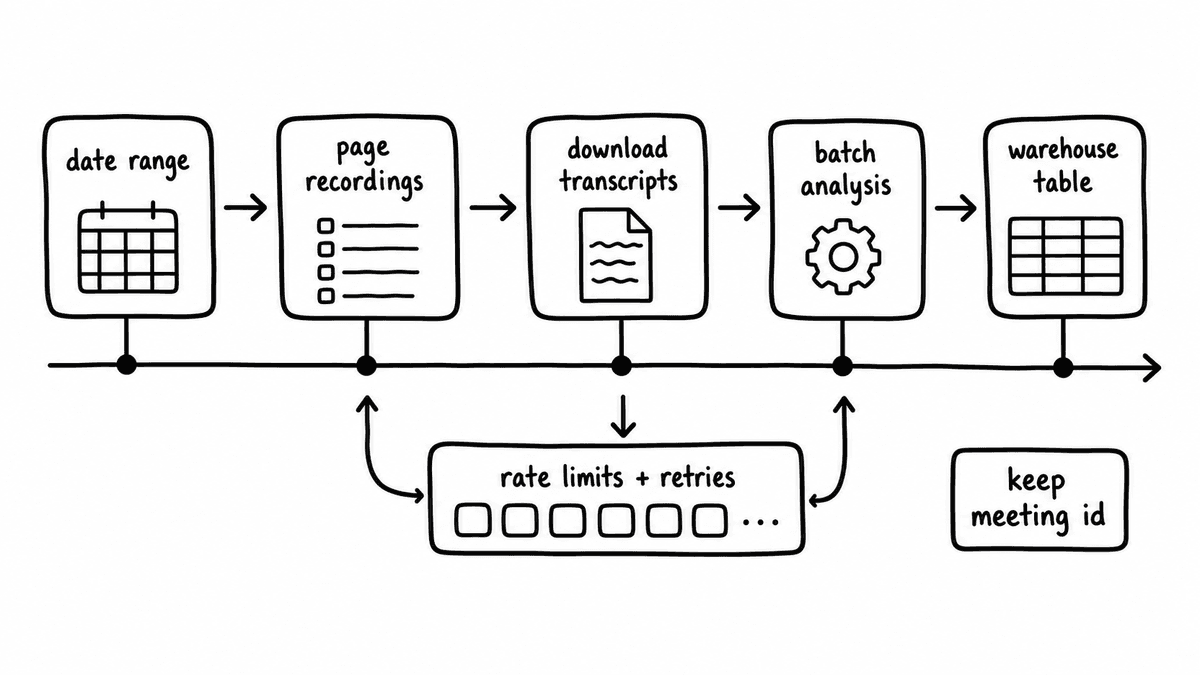
Downloading the VTT transcript with a bearer token
The download URL isn’t a public link, so fetching it needs the same OAuth access token used to list the recordings, passed either through an Authorization: Bearer header or as a query parameter on the URL. Without the token the request is rejected, which catches out teams that store the download URL and try to retrieve it later from a context that no longer holds a valid credential. The token is short-lived, so the download has to happen while it’s still valid, or the pipeline has to refresh the token before pulling the file.
The transcript itself is delivered as VTT, the same caption format used for subtitles, where each cue carries a timestamp range and the spoken text for that segment. That format is convenient for playback and awkward for analysis, because the timestamps and cue numbering sit between the words you actually want, and any downstream evaluation has to parse the cues into plain, speaker-attributed text first. Parsing VTT into clean transcript text is the step that turns a caption file into an input a language model or an evaluation layer can reason about, and it’s worth doing carefully, because clean inputs matter more to the quality of the output than most teams expect. We cover why in the post on clean conversation inputs.
Webhook-driven ingestion versus historical backfill
For calls happening now, the event-driven pattern is the one to build, because the recording.completed webhook fires when a cloud recording finishes processing and hands you a payload that already identifies the meeting and its files. That payload is the trigger for an automated pull: the webhook arrives, your handler reads the meeting’s recording files, filters for the transcript, downloads it with a fresh bearer token, and passes the text on, all without anyone polling or watching a folder. Building around the webhook keeps the pipeline close to real time and avoids hammering the listing endpoint on a schedule.
For the archive of calls that already happened, backfill is the other half of the picture, and it iterates the users recordings endpoint across a date range with pagination. You walk the from and to window in chunks, follow each next_page_token until a window is exhausted, and pull the transcript file from each recording exactly as the live path does. Most production setups run both: the webhook keeps new calls flowing in, and a one-off backfill job clears the historical archive during onboarding so the structured dataset starts complete rather than only from launch day forward.
From transcript text to structured signals
A downloaded VTT parsed into clean text is where most Zoom integrations stop, and it’s also where the value hasn’t yet arrived, because transcript text is still just text until something turns it into typed fields a workflow can act on. Zoom cloud recordings are unstructured by nature, whereas a CRM opportunity record or a warehouse table expects typed values: a boolean for whether next steps were agreed, a score for discovery quality, a string for any competitor the buyer named. Bridging that gap is a separate layer from the extraction you just built, and it is the layer Semarize provides.
You feed the extracted transcript text to the Semarize API with a Kit that defines the evaluation schema, and you get back a JSON object with one typed field per criterion. The Kit is a versioned group of Bricks, where each Brick evaluates one thing against the transcript and returns a typed value: a boolean Brick returns true or false, a score Brick returns a number on a defined scale, and a string extraction Brick returns the value it found or null. Because the schema is fixed by the Kit version, the field names and types stay stable, so CRM mappings and reporting models don’t break when the recording pipeline feeds in the next call. The same pattern for turning call transcripts into typed CRM fields is covered in the sales call transcripts to CRM-ready JSON post.
Semarize isn’t a transcription service and doesn’t pull the recording for you: it consumes the transcript you extracted from Zoom and returns structured signals for CRM enrichment, warehouse analytics, and downstream automation. The Zoom API gives you the transcript, your pipeline turns the VTT into clean text, and Semarize turns that text into data.
Semarize takes the Zoom transcript you extracted and returns typed JSON your CRM, warehouse, and RevOps automation can use directly.
Common questions
Which Zoom API endpoint returns the transcript?
There’s no dedicated transcript endpoint. You list recordings with GET /v2/users/{userId}/recordings or, for a single meeting, GET /v2/meetings/{meetingId}/recordings, and each recording returns a recording_files array. Every file in that array has a file_type and a download_url, and the transcript is the entry whose file_type is TRANSCRIPT. Extracting it means filtering the array for that file type and downloading the file it points to. The transcript is delivered as a VTT caption file.
What scope do I need to download Zoom cloud recordings?
You need the cloud recording read scope on your OAuth or Server-to-Server OAuth app, granted to the app and carried on the access token. For a backend service reading recordings across many users on an account, an admin-scoped variant such as cloud_recording:read:admin lets a single credential enumerate recordings for the whole account. Cloud recording also has to be enabled on the account, because local recordings never reach the cloud and aren’t exposed through the recording API at all.
How do I download a Zoom recording transcript file?
Read the recording, find the recording_files entry whose file_type is the transcript, and request its download_url with your OAuth access token, passed either through an Authorization: Bearer header or as a query parameter on the URL. The download URL isn’t public, so the request is rejected without a valid token, and the token is short-lived, so the download has to happen while it’s still valid or after refreshing it. The file arrives as VTT, which you then parse into plain, speaker-attributed text.
How do I turn a Zoom transcript into structured CRM fields?
Once you have parsed the VTT into clean transcript text, send that text to the Semarize API with a Kit that defines the evaluation schema. The Kit is a versioned group of Bricks, and each Brick returns one typed value, so the API responds with a JSON object of typed fields: booleans, scores, categories, and extracted strings. Because the Kit version fixes the field names and types, the output maps cleanly to CRM fields and warehouse columns. Semarize consumes the transcript you extracted from Zoom; it doesn’t record or transcribe the call itself.
Continue reading
Read more from Semarize
Zoom Transcripts to CRM-Ready Sales Signals: An API-First Pipeline for Scoring and Field Extraction
Transcript access isn't the same as usable data. Here is how to turn Zoom transcripts into CRM-ready sales signals with an API-first pipeline: webhooks, scoring built around buyer understanding, and typed field extraction into CRM or BI.
How to Get Conversation Intelligence From Zoom and Teams Without Buying Another Platform
Zoom and Teams already generate the transcripts you need. This guide shows how to get conversation intelligence from Zoom and Teams by routing those transcripts through an evaluation API, producing CRM enrichment, coaching signals, and QA coverage without adding a recording platform or paying per-seat for a duplicate transcript.
Conversation Intelligence for Developers: Don't Build a Fragile Pipeline, Don't Buy a Black Box
Most teams don't fail to add conversation intelligence because the model is bad; they fail because the integration is fragile and unstructured. The fix isn't a better LLM pipeline or a platform API you can't control. It's a layer that takes a transcript, runs it against a versioned Kit, and returns deterministic typed JSON you can test, version, and route into your product.