
How to Get Conversation Intelligence From Zoom and Teams Without Buying Another Platform
Sales and customer success teams already running on Zoom or Microsoft Teams hold the raw material for conversation intelligence, and they buy a second platform to get it anyway. Both Zoom and Teams generate transcripts natively. The text exists, sitting inside a video platform, disconnected from the CRM enrichment, coaching, and QA workflows that would actually use it. You can get conversation intelligence from Zoom and Teams without adding a recording platform: take the transcript they already produce and route it through an evaluation API that returns structured fields.
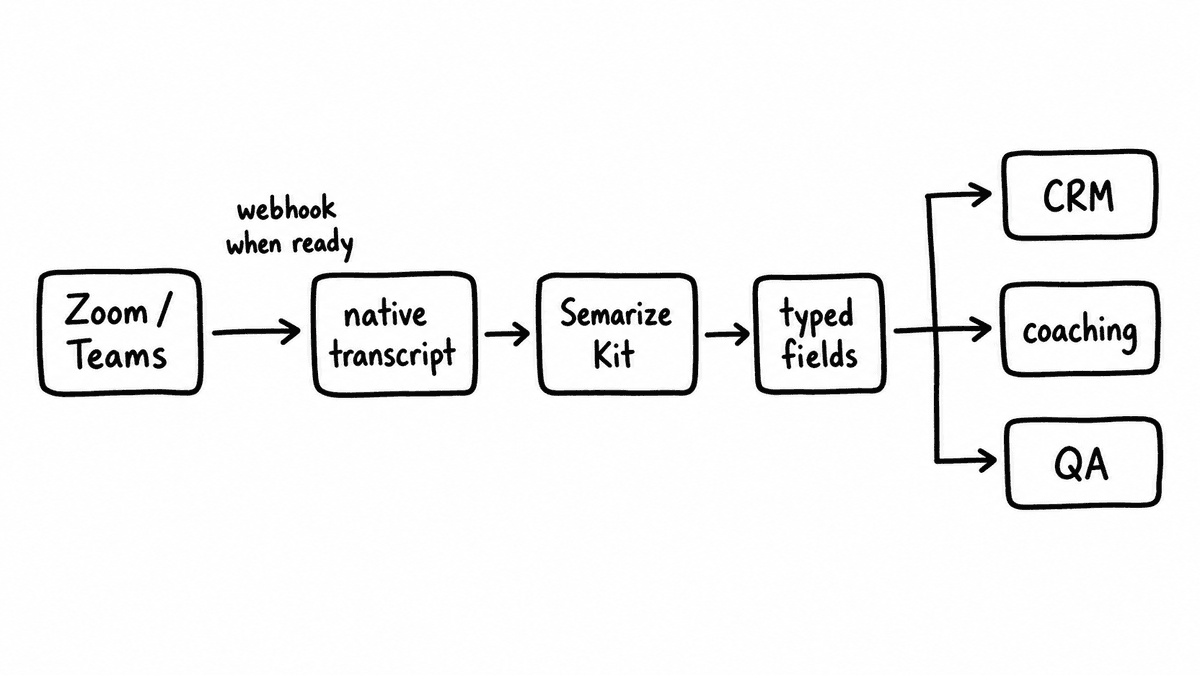
The short version of the workflow: a call ends, Zoom or Teams fires a webhook when the transcript is ready, the transcript text goes to a conversation intelligence API, and the structured fields that come back are written to the CRM record, the coaching dashboard, or the QA tracker. That gives you CRM-ready scored values, coaching signals, and QA coverage across every call, without a new recording platform in the stack and without the per-seat licence that usually rides along with one. The work is a pipeline a RevOps team can assemble in an afternoon, not a procurement cycle.
| Approach | What it adds | Trade-off | Best for |
|---|---|---|---|
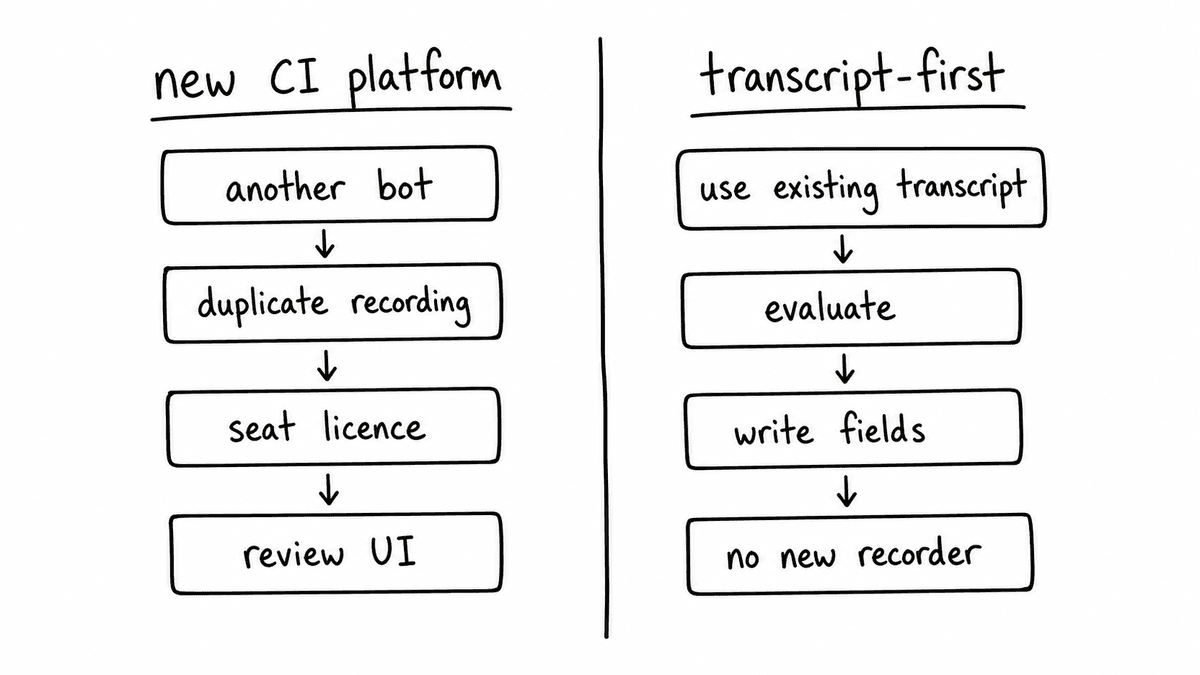
| Dedicated CI platform | Rep-facing review UI, highlights, its own recording and transcript | Another platform and bot in the stack, recording a duplicate | Teams that want the coaching UI experience |
| Transcript-first pipeline | Structured, scored fields from transcripts you already have | You wire a light pipeline once | Teams that want CRM, QA, and coaching data, not a new platform |
The transcript is already there
Both Zoom and Microsoft Teams expose transcript content through their APIs and webhook systems. Zoom’s webhook events notify a connected application when a recording finishes and the transcript is ready, and the transcript can then be retrieved through the Zoom API and passed downstream. Teams exposes meeting recordings and transcript content through the Microsoft Graph API, with webhook notifications for completed meetings. In both cases the content a structured evaluation needs is available without a third-party bot in the room.
The transcript from each platform comes with speaker-attributed text and timestamps, and the speaker attribution is the part that matters most. Evaluation criteria usually test for buyer-side evidence specifically: whether the buyer articulated a problem, whether the buyer named a timeline, whether the buyer raised a competitor. A transcript that separates buyer turns from rep turns makes those criteria answerable; an undifferentiated wall of text makes them much harder to assess. Native Zoom and Teams transcripts carry that attribution, which is why they are a workable input and not just a recording.
What the transcript gives you, and what it does not
What the transcript doesn’t give you is structured evaluation against your sales methodology, your QA rubric, or any criteria specific to how your team sells. That is a separate layer that sits downstream of the transcript, and it is the layer that produces the typed, scored fields CRM enrichment, coaching, and QA actually consume. The video platform hands you the words; it doesn’t decide whether the call cleared a qualification bar or whether a renewal is at risk.
This is where the buy-another-platform instinct goes wrong. The problem was never that Zoom and Teams fail to record, because they record fine. The gap is the absence of an evaluation layer that turns the recording into data, and a second recording platform mostly duplicates the part that already works while adding its own version of the part that is missing. Adding only the evaluation layer closes the gap without the duplication.
Getting conversation intelligence from Zoom and Teams, step by step
The pipeline has three steps. First, a webhook from Zoom or Teams fires when a recording and transcript are complete. Second, the transcript text goes to the Semarize API as a POST /v1/runs with the Kit ID that defines the evaluation schema, and the Kit scores every Brick against the transcript. Third, the structured object that comes back is written to the CRM opportunity record, the coaching dashboard, or the QA tracker, either directly through the CRM API or through an automation layer.
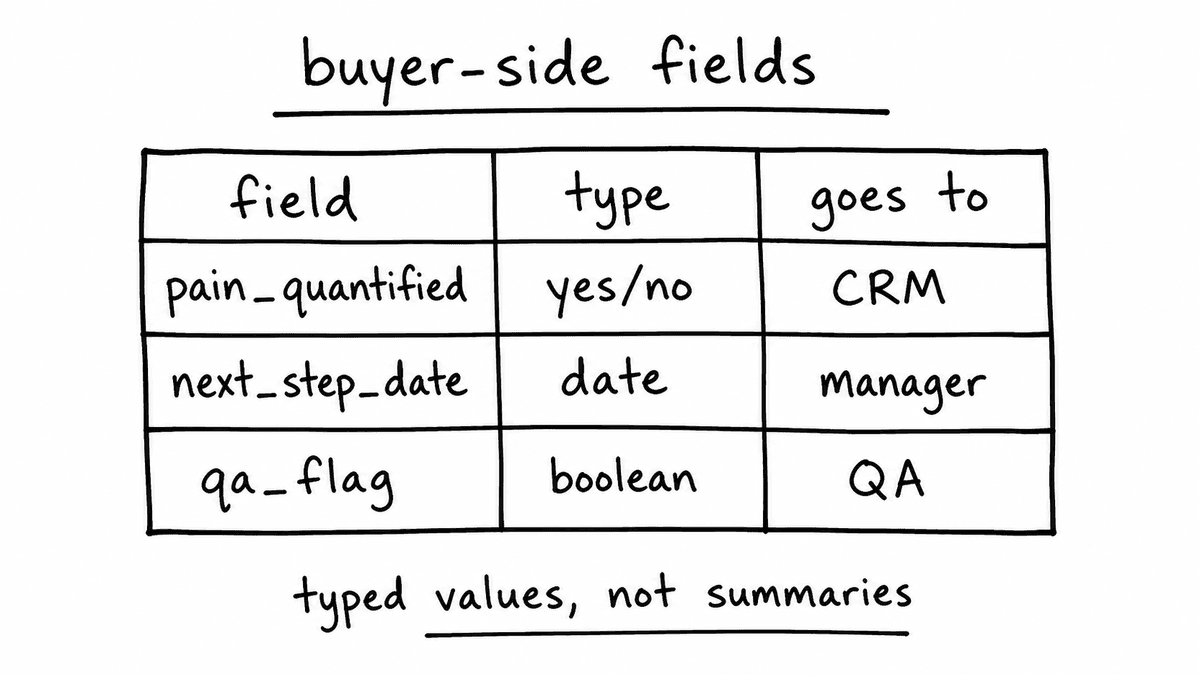
The shape of that output is the point of the whole exercise. A discovery Kit might return an object with fields like pain_quantified as a yes/no, economic_buyer_engaged as a yes/no, and next_step_date as a date, with a short evidence quote behind each one. Those are values a CRM field or a report can use directly, which a transcript or a prose summary isn’t.
Teams comfortable with Make or n8n can build this without a developer: the Zoom or Teams webhook as the trigger, an HTTP module that calls the Semarize API with the transcript text, and a CRM or database module that writes the output. Engineering teams can build the same pipeline as a small service that calls the API directly, handling transcript retrieval and output routing in whatever language they already run. Either way the shape is identical: trigger, evaluate, write.
CRM enrichment from Zoom and Teams calls
The most immediate use case for a RevOps team is CRM enrichment: writing structured signal from every call to the opportunity it belongs to. A Zoom or Teams call is usually scheduled from the CRM calendar or carries a meeting subject with the deal or account name, and the automation layer uses that association to find the opportunity ID and write the scored fields to the right record.
The fields that earn their place are the ones that represent buyer-side evidence: whether pain was articulated with a consequence, whether the economic buyer was engaged, whether a decision timeline was established. These are the fields that tell a manager whether a deal is genuinely qualified or whether the qualification is sitting in the rep’s head instead of the record. The CRM enrichment playbook covers the field mapping and automation patterns for Salesforce and HubSpot in detail.
Coaching and QA coverage on every call
Once the transcript pipeline exists, the same structured output that drives CRM enrichment also drives coaching and quality assurance. A coaching Kit might score discovery quality, next-step confirmation, and champion engagement across every call in a rep’s book. A QA Kit might check process adherence, disclosure compliance, and objection handling. Both run against the same transcript and return separate structured objects, which feed separate consumers: the coaching dashboard for the manager and the QA tracker for the enablement or compliance team.
The change in coverage is the point. Manual QA programmes typically review five to ten percent of calls, chosen by reviewers who may, consciously or not, pick the calls that are easiest to score. An automated pipeline applies identical criteria to every call with no selection bias, which is a different kind of measurement entirely. The 100% QA scoring post covers what shifts when coverage moves from sampled to complete.
When a dedicated recording platform still earns its place
The transcript-first approach serves teams whose main requirement is structured signal from call content they already have. It doesn’t replace the rep-facing call review experience, the moment tagging and highlight reels, or the deal intelligence dashboards that platforms like Gong or Chorus provide. A team that uses those features heavily will still want a dedicated platform for the coaching UI, and there’s nothing wrong with running both. Semarize is supplemental here: it adds a structured output layer those tools don’t expose natively, without replacing them.
The teams this serves most directly are the ones running Zoom or Teams as their primary video platform with no dedicated conversation intelligence tool, or with one whose API output is too thin for their RevOps workflows. For them, the pipeline adds structured signal extraction without a new platform, without another bot joining calls, and without changing anything about how meetings are run today.
Semarize connects to Zoom and Teams transcript output and returns structured call signals for CRM enrichment, coaching, and QA coverage across every call, with no recording platform to add.
Common questions
Is Zoom’s native transcription good enough for evaluation?
For most sales and customer success calls, yes. Zoom’s transcription is accurate enough for the criteria that matter most: whether specific topics were raised, whether commitments were made, whether qualification points were discussed. Heavy accents, unusual industry vocabulary, or poor audio can occasionally affect results on specific fields. A team with concerns about transcript quality can run a dedicated transcription API such as Deepgram as an intermediate step before evaluation, but for typical RevOps use cases the native transcript is sufficient.
How is the Zoom or Teams call linked to the right CRM opportunity?
The most reliable approach uses the meeting title or calendar invite metadata to look up the opportunity, since sales teams usually include the account or deal name when scheduling from CRM. Make or n8n can add a CRM lookup step that matches the meeting title or an attendee email to the right record before writing the scored fields. For high meeting volume, a consistent naming convention or a scheduling tool that embeds the opportunity ID in the meeting subject makes the match more dependable.
Can the pipeline run on customer success or internal calls too?
Yes. The evaluation schema is defined per Kit, so different Kits apply to different call types. A customer success Kit might score renewal risk signals and product adoption depth; an onboarding Kit might check whether success criteria were established on the first call. The trigger can route each call to the appropriate Kit based on meeting type, attendee list, or calendar category, so the right evaluation runs on the right calls without manual sorting.
Do we need to stop using our current recording tool to do this?
No. The approach adds an evaluation layer on top of transcripts you already have, so it runs alongside whatever you use today. Teams on Gong or Chorus can keep them for the rep-facing review experience and route the same transcripts through the evaluation API to get structured fields their CRM and reporting workflows can use. Nothing about how calls are recorded has to change.
Continue reading
Read more from Semarize
Conversation Intelligence for Developers: Don't Build a Fragile Pipeline, Don't Buy a Black Box
Most teams don't fail to add conversation intelligence because the model is bad; they fail because the integration is fragile and unstructured. The fix isn't a better LLM pipeline or a platform API you can't control. It's a layer that takes a transcript, runs it against a versioned Kit, and returns deterministic typed JSON you can test, version, and route into your product.
CRM Enrichment From Sales Calls: The RevOps Data Ops Playbook
Most CRM enrichment stalls at 30% field coverage because the output is unstructured - reps updating from memory, summaries stored as notes. The fix is a structured extraction pipeline: transcript to consistent fields to CRM to automation triggers. This playbook covers the schema, the routing, and the implementation in Salesforce and HubSpot.
Gong Captures the Transcript. Here’s What It Can’t Score.
Gong’s scoring runs against a fixed model — you can’t attach your product documentation, rate card, or qualification playbook to its evaluation layer. For four evaluations that matter — product accuracy, pricing audit, methodology A/B testing, and deal readiness scoring — knowledge grounding and KB isolation are the only architecture that works.