
How to Build a Win/Loss Analysis Tracker Without a Developer
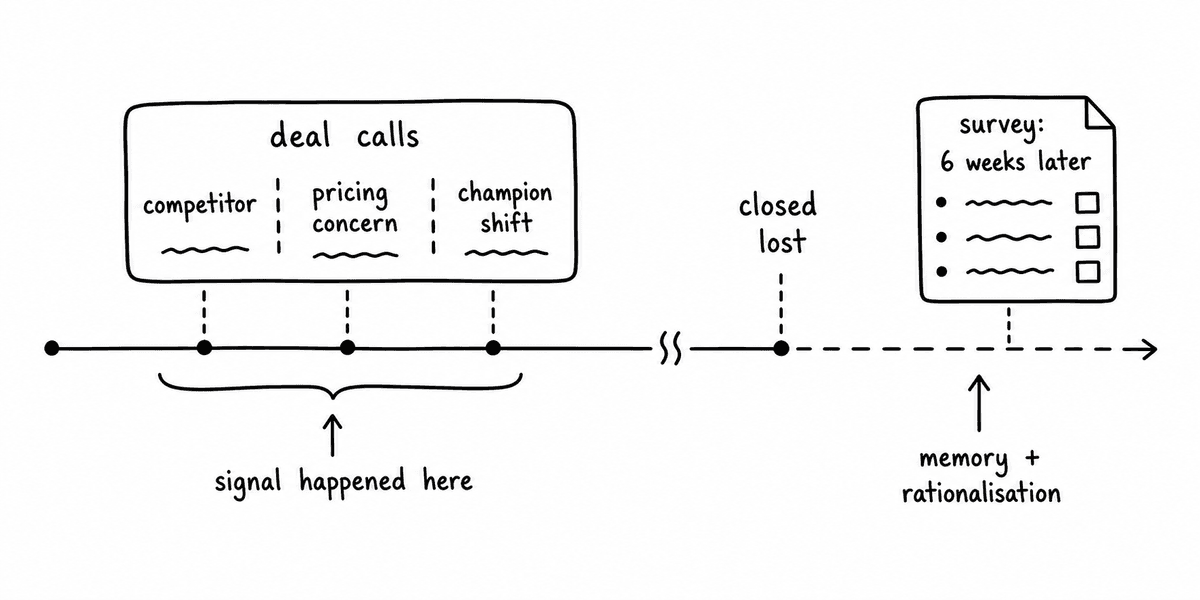
Most win/loss programmes are built on surveys that arrive too late, from people who have moved on, about deals they barely remember. The win/loss analysis ends up reflecting what a buyer was willing to say several weeks after the decision rather than what actually happened across the conversations that led to it. The evidence was there, on every call, in the objections raised, the competitors mentioned, the enthusiasm of the champion, and the questions the economic buyer asked or did not ask. It just was not captured in a form anyone could use.
Building a win/loss tracker that draws from structured call signals rather than retrospective surveys is now a one-day project for anyone comfortable with Make or n8n, and it does not require a developer. This post covers the workflow from call to tracker, what signals to capture, and how to get the output into Notion, Airtable, or a simple vibe-coded interface without writing back-end code.
Why call signals make better win/loss data than surveys
Survey-based win/loss analysis has two structural problems that signals from calls do not. First, it requires the buyer to respond, which most do not, and those who do are self-selected in ways that bias the data, typically towards buyers who had a strong positive or negative experience. Second, the time between the decision and the survey means the data reflects memory rather than evidence, and memory of a buying process is heavily influenced by how the decision turned out rather than what was actually said during it.
Structured signals extracted from calls are contemporaneous, cover every deal that had calls attached to it, and represent what was actually said rather than what someone recalls being said. The case for replacing surveys with call signals covers this in detail. The practical question this post addresses is how to actually build the tracker.
What to capture: the win/loss signal schema
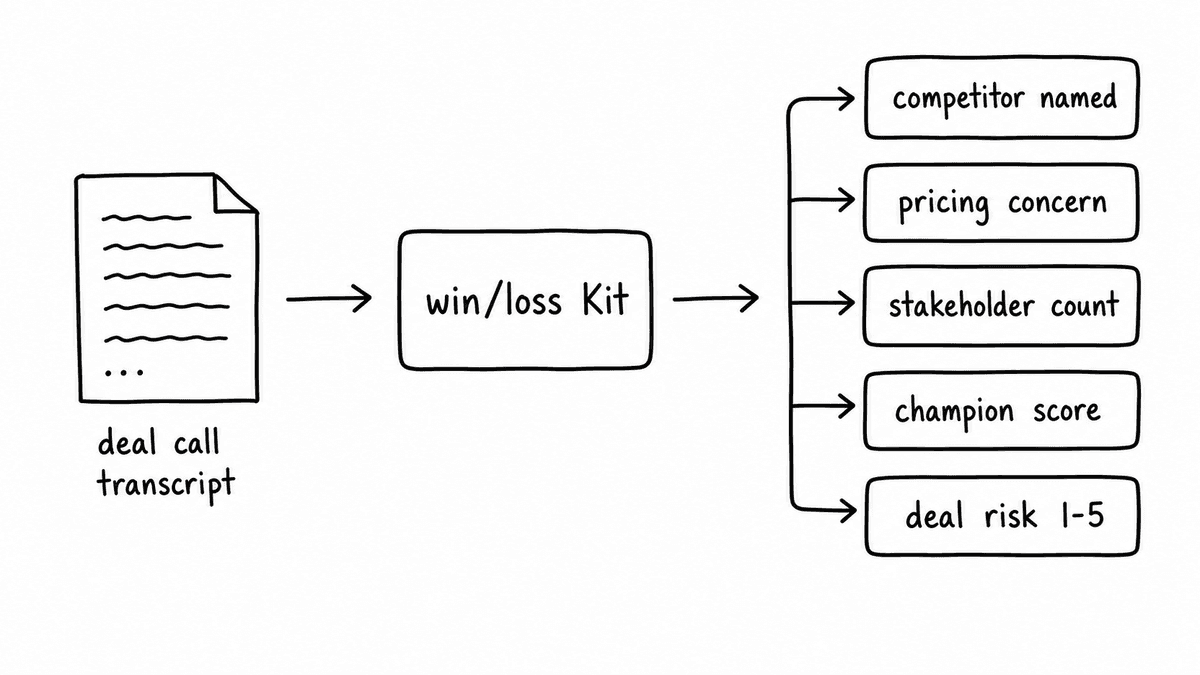
A win/loss Kit in Semarize is a group of Bricks that together tell the story of how a deal progressed through calls. Designing it well means thinking about the questions your sales leadership and product team actually want answered, and working backwards to the signals from calls that would answer them.
A solid win/loss Kit typically covers five areas. Competitive presence tracks whether a named competitor was mentioned, which one, and how the conversation around them went: was the rep able to differentiate, did the buyer initiate the comparison, and what was the buyer’s apparent level of interest in the alternative? Pricing signal captures whether pricing was raised as an objection, how the buyer framed it (value concern versus budget constraint), and whether a comparison to another vendor’s pricing came up. Champion engagement scores how strong the internal advocate appeared across the conversation: were they actively selling internally, were they just being polite, or was their engagement cooling. Economic buyer involvement records whether the economic buyer participated and, if so, what signals their questions gave about their priority level. And discovery quality scores how thoroughly the buyer’s pain, business case, and urgency were established before any commercial conversation started.
The output of this Kit, applied to every call on a deal, gives you a longitudinal view of how the deal health changed over time, grounded in conversation evidence rather than rep opinion.
The workflow: from call to tracker
The automation flow has four steps and can be built in Make or n8n without code. The first step is the trigger: a call ends and the recording platform (Gong, Fathom, Fireflies, or any platform that delivers transcripts via webhook) sends the transcript to an endpoint. In Make, this is a webhook module set to listen; in n8n, it is a webhook trigger node.
The second step is the Semarize API call: the automation sends the transcript text to the Semarize API with the win/loss Kit ID. The Kit evaluates the call and returns a structured JSON object with one field per Brick, typed and scored. In Make, this is an HTTP module configured with the Semarize API endpoint; in n8n, it is an HTTP request node. The response comes back within a few seconds and contains all the signal fields defined in the Kit.
The third step is CRM lookup: the automation uses the call’s associated CRM opportunity ID to pull the deal name, stage, owner, and outcome from Salesforce or HubSpot. This provides the context that makes the signal data useful for analysis: the signals need to be associated with the deal they came from, and the deal outcome (won, lost, or still open) needs to be attached to the record when it is eventually known.
The fourth step is the write to the tracker: the automation takes the signal fields from Semarize plus the deal context from CRM and writes a new row to an Airtable base, a Notion database, or a custom internal UI built with Lovable or a similar vibe-coding tool. Each row represents one call, linked to the deal it came from, with the scored signal fields as columns.
Building the tracker view
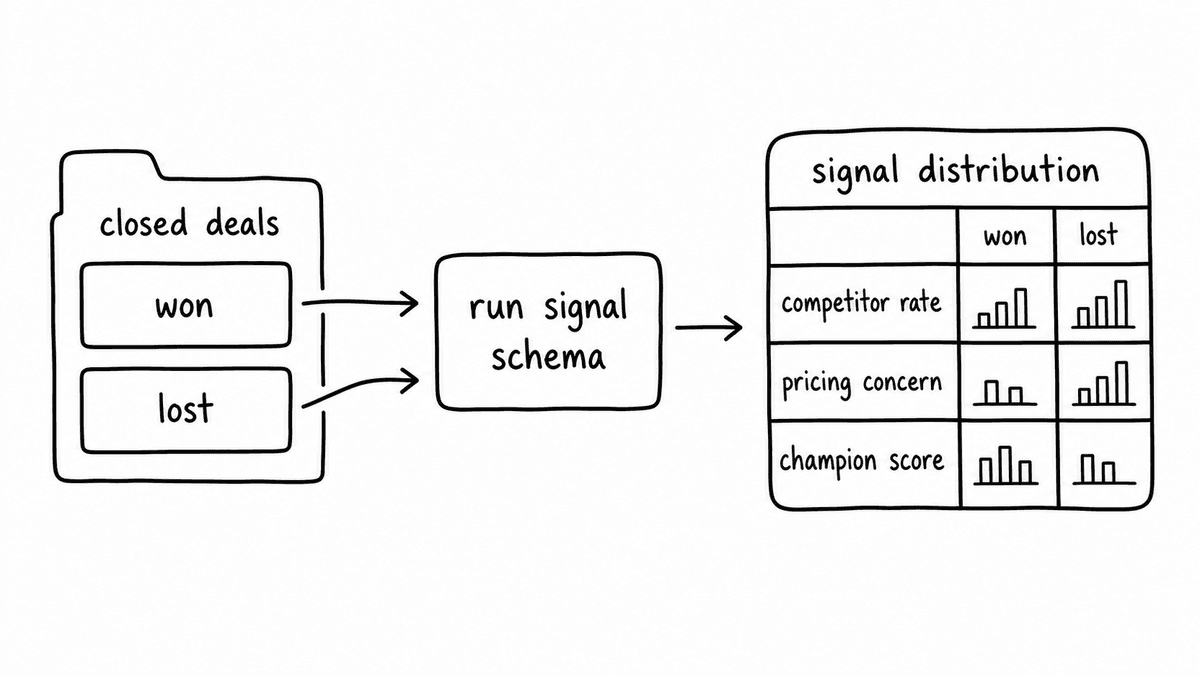
Airtable and Notion both work well for the tracker layer without any custom development. An Airtable base with a calls table and a deals table, linked on opportunity ID, lets the revenue team filter by territory, rep, deal size, or competitive scenario and see the win/loss signal patterns across the filtered set. Grouping by deal outcome (won versus lost) and comparing the average discovery quality score, champion engagement score, and pricing objection frequency gives a clear picture of which signals correlate with which outcomes.
For teams that want a more tailored interface, a vibe-coded internal tool built with Lovable or Base44 can pull from the same Airtable or Supabase backend and present the data in whatever view the sales leadership team wants: a deal-level summary with call-by-call signal trends, a competitive analysis view grouped by competitor mention, or a rep-level view showing how signal patterns differ between top and bottom performers.
The vibe-coded approach gives more control over the analysis experience without requiring a developer to build and maintain it. The interface can be iterated on as the team learns what views are actually useful for sales reviews and product feedback cycles, and the underlying data structure does not change when the interface does.
Closing the loop: connecting signals to outcomes
The tracker becomes most useful when deal outcomes are connected back to the signals that preceded them. This happens either automatically, when Salesforce or HubSpot updates the deal stage to “Closed Won” or “Closed Lost” and a second automation flow updates the outcome field on all calls associated with that deal, or manually as part of the weekly pipeline review where the RevOps team marks closed deals in the tracker.
Once outcomes are attached, the tracker supports the analysis that win/loss programmes are actually designed to answer: which competitive scenarios are we losing and what is happening in those calls that differs from our wins? Is discovery quality correlated with close rate? Are deals where champion engagement drops across the middle calls less likely to close? These questions are answerable from structured signals in a way they never are from surveys, because the evidence is there for every deal rather than the subset where a buyer chose to respond.
Semarize produces the structured call signals that make this tracker possible, with a Kit designed for win/loss analysis running on every deal call automatically.
Common questions
Do you need developer access to build this workflow?
No. The core workflow, from transcript webhook to Semarize API call to Airtable or Notion write, can be built entirely in Make or n8n without writing any code. Both tools support HTTP requests natively, so the Semarize API call is a configured module rather than a custom integration. For the tracker interface, Airtable and Notion require no development at all; a custom vibe-coded UI requires prompting a tool like Lovable or Base44 but not writing back-end code.
How many calls should the Kit run on per deal?
The Kit should run on every call associated with the deal, not just specific call types. The longitudinal signal across calls is often more informative than any single call: a deal where champion engagement scores drop sharply between the second and third call shows a pattern that a single snapshot cannot. For deals with many calls, you can configure the automation to score all calls but only surface calls above a certain duration threshold in the tracker to reduce noise.
Can this replace a formal win/loss interview programme?
It replaces the data-gathering part of win/loss, which is the hardest part to do consistently. Structured call signals give you coverage on every deal with calls, without survey response rates, buyer availability, or memory bias. What they do not replace is the post-decision conversation with buyers who are willing to speak frankly about their decision process, which occasionally surfaces strategic insight that call signals alone would not capture. The two approaches complement each other; the signals give you the quantitative baseline and the interviews give you the qualitative depth on deals that matter most.
What is the best destination for the win/loss data: Airtable, Notion, or a custom UI?
Airtable is the fastest starting point: the linked tables, filtering, and grouping features work immediately for win/loss analysis without any setup beyond creating the base. Notion is better if the team’s context and commentary around deals lives there and the tracker needs to be integrated with existing deal documentation. A custom vibe- coded UI is worth the extra hour of setup if the team wants a purpose-built experience with specific views that Airtable and Notion cannot easily produce, such as competitive heat maps or signal trend charts per rep.
Continue reading
Read more from Semarize
Stop Running Win/Loss Surveys. Start Capturing Deal Signals From Calls.
Win/loss surveys have a structural timing problem: they collect buyer memory after the outcome, not the decision inputs during the deal. Competitor mentions, pricing responses, and stakeholder dynamics exist in call recordings as they happen. Extracting them as structured signals makes win/loss real-time - and far more useful for deal coaching and pipeline risk.
CRM Enrichment From Sales Calls: The RevOps Data Ops Playbook
Most CRM enrichment stalls at 30% field coverage because the output is unstructured - reps updating from memory, summaries stored as notes. The fix is a structured extraction pipeline: transcript to consistent fields to CRM to automation triggers. This playbook covers the schema, the routing, and the implementation in Salesforce and HubSpot.
MEDDICC Scoring From Discovery Calls
Most MEDDICC data is stale before it reaches CRM. Reps update fields from memory after the call, introducing timing gaps and sampling bias that make qualification scores unreliable. Extracting MEDDICC signals directly from transcripts fixes the data freshness problem that better training never will.