
Best Tools to Get Conversation Data Into Your Data Warehouse in 2026
Every sales call a team runs becomes a transcript, and almost none of those transcripts ever reach the warehouse where the analytics actually live. The recordings pile up in Gong, the dashboards live in the BI tool, and the analyst who wants to know whether reps surfaced quantified pain across the quarter has nowhere to run that query. The transcripts exist, the recordings exist, the dashboards exist, and still the one table that would answer the question doesn’t. To get conversation data into your data warehouse in a form that joins to opportunities and survives the next platform update, you have to get four separate things right: the transcript, the typed fields, the orchestration, and the load. Miss the field layer and the connector ships you a table no one can query.
The category has matured. In 2026 there are credible options at each layer of the pipeline: transcription, structured extraction, orchestration, and warehouse connectors. The separation matters because the layers fail for different reasons and the layer that decides whether your warehouse table is queryable isn’t the one most teams spend their budget on. This is a practical guide to the tools at each layer, who each one fits, and where each one stops being the right choice.
The short answer
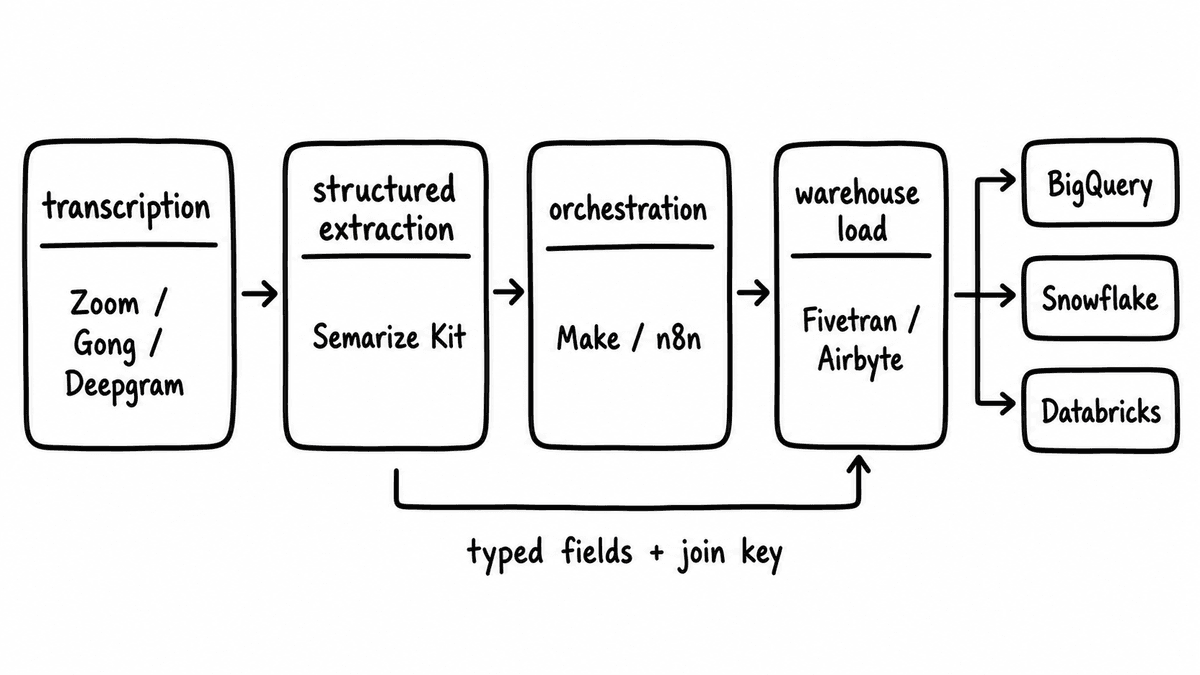
Pick your transcription source for consistent, speaker-attributed output rather than raw accuracy: Zoom, Teams, Meet, Gong, or a dedicated engine like AssemblyAI or Deepgram if your current source doesn’t label speakers. Use a structured extraction layer to turn transcript text into typed, warehouse-ready fields against a schema you control; this is where Semarize sits, returning JSON with one typed value per criterion. Orchestrate with Make, n8n, or a small custom service that calls the extraction API on each finished call. Then write to the warehouse with Fivetran, Airbyte, or a direct streaming write to BigQuery, Snowflake, or Databricks. The connector itself is rarely the hard part. The work is in producing fields worth loading and attaching a join key before they land.
The four layers to get conversation data into your data warehouse
| Layer | Tool options | What to evaluate | Best fit |
|---|---|---|---|
| Transcription | Zoom, Teams, Meet, Gong, AssemblyAI, Deepgram | Speaker attribution, format consistency, delivery method | Teams whose recorder already exports clean, labelled transcripts |
| Structured extraction | Semarize, custom LLM pipeline | Customer-defined schema, type stability, explicit versioning | Teams that need typed, joinable fields, not prose summaries |
| Orchestration | Make, n8n, custom service | Webhook triggers, retry logic, error handling, join-key lookup | Teams that want one place to fail and reprocess cleanly |
| Warehouse connector | Fivetran, Airbyte, direct streaming write | Schema mapping, incremental loads, version handling | Teams that already load other sources the same way |
Layer 1: transcription and source
The transcription layer is where call audio becomes text, and for most sales teams the source is already chosen: Zoom, Teams, Meet, Gong, or a recorder like Fathom or Fireflies. The decision that matters for warehouse work is which source delivers transcripts in a consistent, speaker-attributed format over webhook or API, run after run, without the field names and structure drifting between releases. Public accuracy benchmarks matter far less than that consistency.
Speaker attribution is the requirement teams underweight most often. A transcript that separates buyer turns from rep turns is far more useful for structured extraction than one that doesn’t, because buyer-side criteria need buyer-side text, and without labels the extraction layer has to guess who said what before it can evaluate anything. Where the existing source doesn’t provide reliable labels, a dedicated engine like AssemblyAI or Deepgram can be slotted in as an intermediate step to improve attribution before extraction runs. Getting the input right before reaching for a better model moves warehouse quality more than the model choice usually does.
Best fit: teams whose recorder already produces clean, labelled transcripts and exposes them over an API or webhook. Not the best fit to over-invest in here: teams chasing marginal word-error-rate gains, since attribution and format consistency move warehouse quality far more than the last percentage point of accuracy.
Layer 2: structured extraction
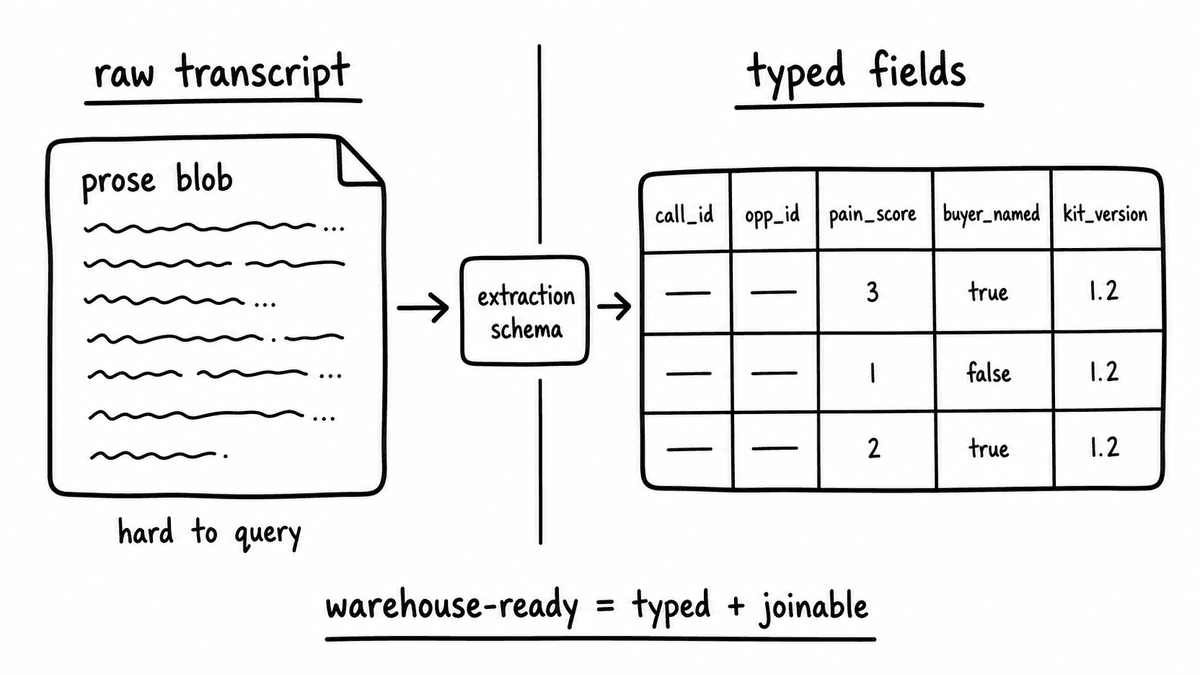
The extraction layer is where transcript text becomes typed fields, and it is the layer that decides whether the data arriving in the warehouse is queryable, joinable, and stable enough for production. A summary paragraph can’t be aggregated; a column of typed values can. This is the difference between a transcript you can read and a row you can group, filter, and join.
Semarize is built for this layer. The evaluation schema is defined by the customer as Bricks, where each Brick asks one evidence-answerable question about a conversation and returns one concrete typed value: a yes/no, a score on a defined scale, a category, or a list of extracted strings. Related Bricks are grouped into versioned Kits, and every run of a Kit returns the same shaped JSON object with one field per Brick. Because the Kit is versioned, field names and types don’t change silently between runs; a contract change is an explicit new version, not a surprise in production. The warehouse table can be derived directly from the Kit definition, and it changes only when you deliberately deploy a new version. The conversation data warehouse post covers the table patterns for BigQuery, Snowflake, and Databricks in detail, and the data science use case shows how those typed fields feed pipeline modelling.
The alternative is a custom extraction pipeline on a general-purpose LLM API. That route gives you full control and works, but you then own the schema design, the prompt maintenance, the output normalisation, and the versioning logic, and that surface tends to grow when the schema evolves or the model provider changes its API. Semarize is supplemental here rather than a replacement for your recorder: it accepts transcript text from Gong, Fathom, Zoom, Teams, Meet, or an upload, processes after the call, and returns typed JSON over API or webhook.
Best fit: teams that need typed, schema-stable fields to score calls, enrich the CRM, or populate a warehouse, especially RevOps teams and GTM engineers building automation on top of conversation signals. Not the best fit: teams that only want a rep-facing call-review screen, a meeting recorder, or a coaching dashboard, since extraction produces data for systems, not a UI for individual reps.
Layer 3: orchestration
Orchestration connects the transcript source to the extraction layer and the extraction output to the warehouse. For teams comfortable with no-code automation, Make or n8n handle the core flow: a webhook fires when a call completes, an HTTP step calls the extraction API with the transcript, and a later step writes the result to the warehouse destination. Both support retry logic and error notifications, which matters in production where a dropped webhook needs to be caught and reprocessed rather than silently lost.
For teams building a custom service, the same logic runs as a small API service in whatever language and infrastructure you already operate. Semarize exposes a standard REST API, so the integration is an HTTP request carrying the transcript and the Kit identifier, and the response is a JSON object you can deserialise and route anywhere. Delivery supports synchronous responses, polling, and webhooks, so the same service can both process live calls as they finish and work through a backlog of older transcripts you submit. Developers can read the full reference on the developer docs.
Best fit: any team that wants a single place where a run can fail, be logged, and be reprocessed. Not the best fit: teams expecting a no-code tool to also manage warehouse migrations, since schema versioning belongs with the extraction contract and the warehouse, not the automation step.
Layer 4: warehouse connectors
The connector is the final step that writes structured call fields to a queryable table. Teams that already run Fivetran or Airbyte for CRM and event data can extend the same pattern: land the scored output in an intermediate store such as an Airtable base or a Supabase table, then let the existing connector load it into the warehouse on a schedule. This keeps conversation data ingesting the same way every other source does, which is worth more operationally than it sounds.
Teams that want a more direct path can write to BigQuery, Snowflake, or Databricks through their native streaming APIs straight from the orchestration layer, so the extracted fields land within seconds of a call ending and no intermediate store is needed. The trade-off is tighter schema management at the warehouse: each Kit version needs a migration or a versioned table so that a new field, or a renamed one, doesn’t break queries an analyst already depends on.
Best fit: teams loading other sources through Fivetran or Airbyte who want one consistent ingestion model. Not the best fit for a direct streaming write: teams without the discipline to manage warehouse migrations, who will be better served routing through an intermediate store and a managed connector.
The join key problem, and how to solve it
The single most common reason warehouse-ready conversation data fails in production is a missing or mismatched join key. Call-level scores become useful when they can be joined to opportunity records, rep performance, and revenue outcomes, and that join needs the call record to carry a CRM opportunity ID, account ID, or contact ID in a format that matches what already sits in the CRM table. A column of perfect scores with nothing to join against answers no question anyone is asking.
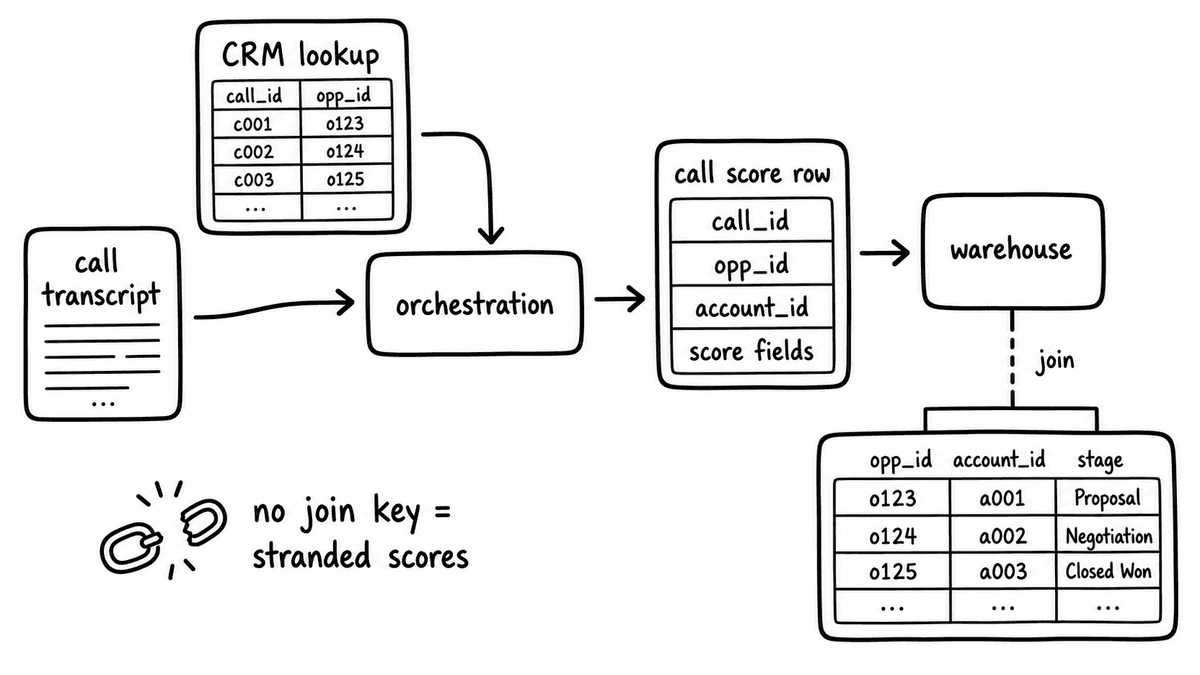
Solve it at the orchestration layer, not the warehouse. When the automation picks up the transcript, it should also look up the CRM opportunity tied to the call and attach that identifier to the scored output before writing anything. The warehouse table then carries a join key from the moment the row is created, and analysts never need a secondary mapping step to connect call scores to deal data.
Where Semarize fits, and where it doesn’t
Semarize is a conversation intelligence API that turns calls, emails, chats, and transcripts into structured JSON signals for automation, reporting, scoring, and downstream workflows. In this pipeline it owns one layer, structured extraction, and it earns its place there by producing typed, versioned, warehouse-ready fields that the transcription source and the connector don’t. It’s supplemental to Gong and Chorus rather than a replacement, adding a structured-output layer those platforms don’t expose natively while leaving recording and storage where they are.
It isn’t a meeting recorder, a call storage platform, a transcription engine, a CRM replacement, or a rep-facing call-review UI. If the requirement is a screen where a manager reviews a single call, that is a different category of tool. If the requirement is a typed table a data science team can query across thousands of calls, the extraction layer is the part that makes it real, and that is the part Semarize is built for.
A working pipeline reads cleanly from end to end: a recorder delivers a speaker-attributed transcript over webhook, an orchestration step looks up the related opportunity and calls the extraction API with the transcript and a Kit ID, the extraction layer returns typed JSON against a versioned schema, and a connector writes that JSON with its join key into the same warehouse the revenue team already queries. No single tool does all four jobs well, and the teams that get reliable results are the ones that choose deliberately at each layer rather than buying one platform and hoping it covers the gaps. Spend the most attention where the value concentrates, on extraction and on the join key, and the rest of the stack becomes ordinary data engineering.
Semarize turns conversations into typed, versioned JSON fields your warehouse can load and your analysts can join, without adding another recorder or dashboard to your stack.
Common questions
What is the fastest way to get conversation data into your data warehouse?
Use the source you already have for transcripts, add a structured extraction layer to turn that text into typed JSON fields against a schema you control, and write those fields to the warehouse with a connector you already trust. The fast path is Make or n8n calling the extraction API on each finished call, then loading the result through Fivetran or Airbyte, or writing directly to BigQuery, Snowflake, or Databricks. Attach the CRM opportunity ID during orchestration so the warehouse row is joinable the moment it is created.
Can an existing Fivetran or Airbyte connector for Gong or Zoom load this data?
Connectors for Gong and Zoom load what those platforms expose over their APIs: call metadata, transcript text, and in Gong's case some pre-built analytics fields. They don’t load customer-defined structured scores, because those fields don’t exist in the source platform. If your warehouse requirement is to query typed fields against a schema you define, a structured extraction layer like Semarize has to produce those fields first. The connector then loads the extraction output, not raw transcripts, into the warehouse.
How do we handle schema changes when a Kit version is updated?
Kit versioning tracks changes explicitly: a new version has a new identifier and the JSON output carries that version in the payload. In the warehouse, include the Kit version as a column on the call scores table so queries can filter by version when comparing scores over time. Adding new Bricks preserves existing columns and appends new ones. Removing or renaming Bricks usually needs a migration or a versioned table to keep existing queries working. The point of versioning is that the change is deliberate and visible, never silent.
Which warehouse is best for call score data: Snowflake, BigQuery, or Databricks?
The best destination is the one your analytics and data science teams already use for CRM and revenue data, because the goal is to make call scores joinable to tables that already exist. If revenue lives in BigQuery, put the scores in BigQuery. If pipeline modelling runs in Databricks, conversation signals belong there. The warehouse choice matters far less than landing the scores in the same system as the data they need to join against, with a join key attached before the row is written.
Does Semarize replace Gong or our meeting recorder?
No. Semarize is supplemental to Gong and Chorus, not a replacement, and it isn’t a meeting recorder, transcription engine, or call storage platform. It’s transcript-agnostic and accepts text from Gong, Fathom, Zoom, Teams, Meet, or an upload, processes after the call, and returns typed JSON over API or webhook. Your recorder keeps recording and storing calls; Semarize adds the structured-output layer those platforms don’t expose natively, so the data becomes queryable in your warehouse.
Continue reading
Read more from Semarize
Conversation Data Warehouse: Consistent Call Fields for BI
BI teams can't query transcripts. They can't join AI summaries to CRM objects. To make conversation data useful for analytics, it needs to arrive as consistent typed fields - booleans, scores, text fields, lists - with join keys that connect calls to opportunities, accounts, and contacts. This is the pipeline, the schema, and the governance model that makes sales call analytics possible in your warehouse.
Conversation Intelligence for Developers: Don't Build a Fragile Pipeline, Don't Buy a Black Box
Most teams don't fail to add conversation intelligence because the model is bad; they fail because the integration is fragile and unstructured. The fix isn't a better LLM pipeline or a platform API you can't control. It's a layer that takes a transcript, runs it against a versioned Kit, and returns deterministic typed JSON you can test, version, and route into your product.
CRM Enrichment From Sales Calls: The RevOps Data Ops Playbook
Most CRM enrichment stalls at 30% field coverage because the output is unstructured - reps updating from memory, summaries stored as notes. The fix is a structured extraction pipeline: transcript to consistent fields to CRM to automation triggers. This playbook covers the schema, the routing, and the implementation in Salesforce and HubSpot.