
The Best APIs for Building Internal Sales Tools in 2026
The best revenue teams in 2026 are not solving pipeline problems by hiring more people. They are engineering the GTM motion: treating sales and marketing as a machine that can be built better, automated further, and measured more precisely. The tools to do that are accessible, the building blocks are well understood, and most of the stack can be wired together without a dedicated engineering team.
The one part most teams have not cracked is conversation data. Calls are where deals actually progress, where qualification happens, where coaching opportunities show up. But getting useful, structured output out of a call recording and routing it to the systems that need it has been harder than it should be. This post covers the full stack for doing that: which APIs are worth building around, how they fit together, and what RevOps and enablement teams are actually shipping with them.
Transcription: you are probably already paying for it
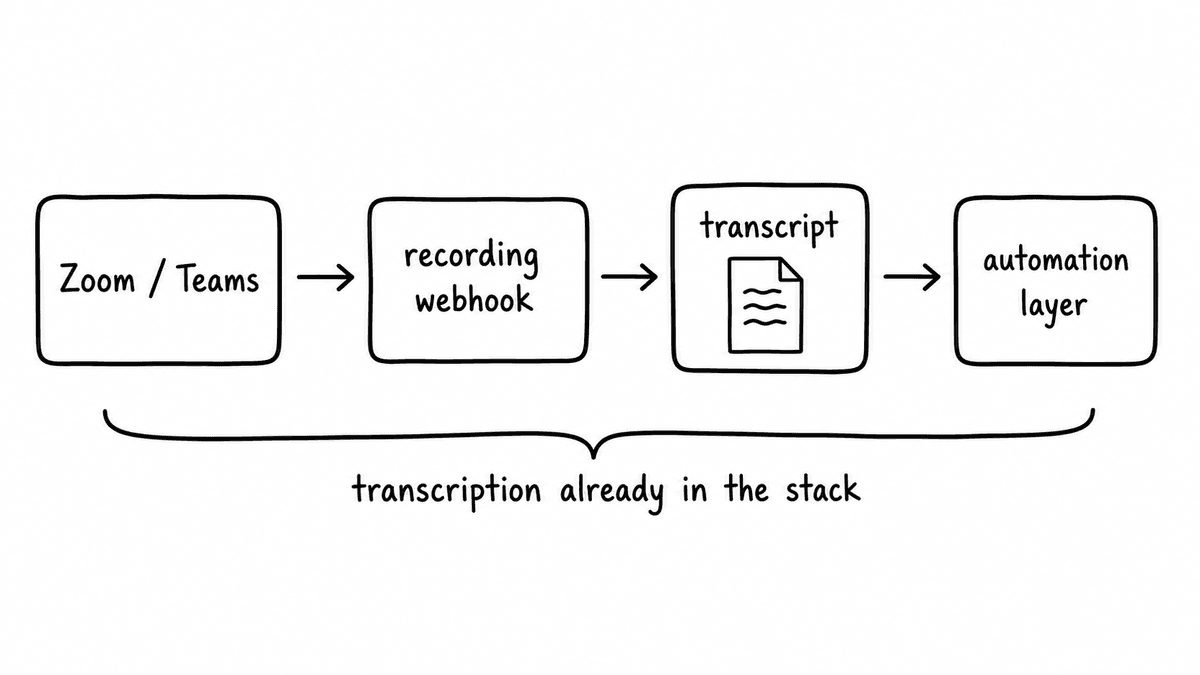
Most sales teams are sitting on a tech stack that can already power most of what they want to build, without adding a single new vendor. Zoom and Teams both include native call recording and transcription, backed by the same frontier speech models that power the third-party meeting bot tools. The accuracy is comparable. The coverage is the same. And unlike a bot that has to join your calls, it is already there, already enabled, and already included in the licences you are paying for.
What most teams have not done is tap into the API feed. Both platforms expose transcripts programmatically: Zoom through its recording webhook events, Teams through the Graph API. When a call ends, the transcript is delivered. You wire that into your automation layer and you have the input to every downstream pipeline: enrichment, scoring, QA, coaching. No bot, no third-party transcription bill, no additional setup beyond the webhook configuration.
If you genuinely need coverage across platforms your organisation does not control, or bot presence for calls happening outside Zoom or Teams, meeting bot tools like Recall.ai are worth looking at. They join calls across Zoom, Teams, Google Meet, and Webex and return clean speaker-labeled transcripts via webhook, abstracting away the cross-platform complexity. Most of these tools are building toward fuller meeting-data platforms rather than remaining pure capture APIs, so they come with more surface area than most internal tooling builds need. For teams whose calls happen in Zoom or Teams, the native feed is the smarter starting point.
n8n: workflow automation with native AI and MCP support
Once you have a transcript arriving via webhook, you need something to receive it, do something with it, and route the output. That is the automation layer, and n8n is the strongest option for teams building AI-native pipelines in 2026. It is open-source, has 400+ native integrations, and can be self-hosted if your data policy requires it. The 2.0 release in January 2026 added 70+ native AI nodes, which means you can call external APIs, parse JSON responses, and route data to Salesforce, Slack, Notion, or wherever else it needs to go without writing custom code.
The feature that makes n8n particularly relevant for this stack is the MCP trigger node. Any n8n workflow can be exposed as an MCP server, which means an AI assistant like Claude can invoke your automation directly from a conversation. For teams building on top of the Semarize MCP, this means you can author an evaluation schema and wire the automation that runs it in the same session. n8n is the right choice for teams who need the escape hatch to custom JavaScript when the visual builder hits its limits, or who want to own their automation infrastructure rather than depend on a managed service.
Make: visual automation for non-technical teams
Make (formerly Integromat) covers the same automation layer as n8n but pitches lower on the technical barrier. The scenario builder is more visual, the error handling is more forgiving, and the managed hosting means no infrastructure to think about. The native connectors for Salesforce, HubSpot, Slack, and Notion cover most of what a RevOps team needs, and any API without a native connector is reachable via the HTTP module.
The tradeoff is flexibility at the edges. Make is excellent for linear pipelines with predictable data shapes, and gets harder to manage as logic branches or transformations get complex. For straightforward automation flows, transcript in and enriched fields routed to CRM, it is hard to beat for speed of setup. The Semarize Make integration guide covers the setup end to end if you want a reference.
Semarize: structured signal from conversation data
Most of the value locked in sales calls is not in the transcript itself. It is in what the transcript means: whether the buyer confirmed a budget, whether pain was specific or vague, whether the rep asked the discovery questions that actually matter. Pulling that out consistently, in a form that other systems can act on, is the problem Semarize is built to solve.
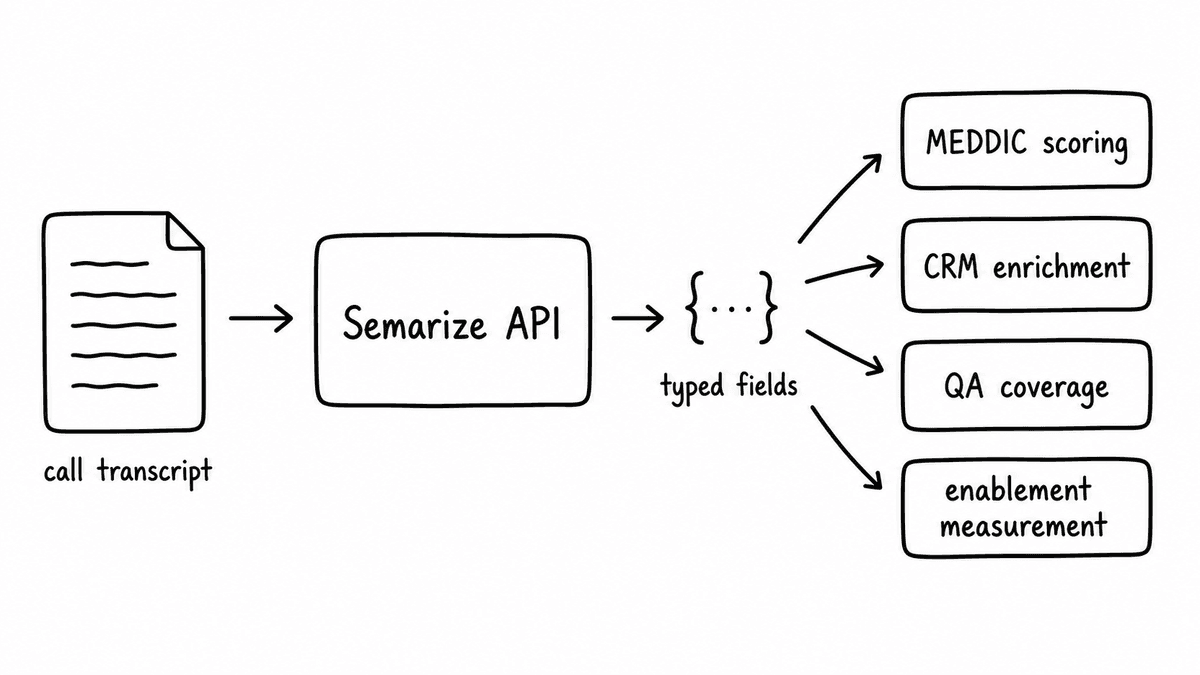
The API takes a transcript and a Kit (a versioned evaluation schema made up of typed Bricks) and returns a structured JSON object: a score per criterion, a confidence level, and the evidence quote from the transcript that grounded the output. The endpoint is POST /v1/runs. You pass a kit code and a transcript string. You get back typed fields you can write directly to Salesforce, feed into a BI dashboard, or route through a QA workflow.
What makes this different from an LLM prompt over a transcript is the schema layer. The Kit is versioned, so scores are comparable across calls over time. The Brick output types are deterministic: a boolean is a boolean, not a string that sometimes says "yes" and sometimes says "it seems likely." That consistency is what makes the output useful as a data source rather than a one-off summary. If you are building anything that needs to aggregate or compare call data across reps or time periods, the schema has to be stable. Semarize is the API that gives you that.
Lovable, v0, and Replit: build the dashboard before you build the dashboard
Once you have structured data coming out of an API, the fastest path to something the team can actually look at is Lovable, Vercel v0, or Replit. Describe what you want in plain English, connect it to the API, and you have a working interface in an afternoon. A scoring table by rep, a detail view with the evidence quote behind each result, a filter by date range or outcome, a flag for records that failed a specific check: none of that requires writing component code. The output is a real deployable application you own, not a configured widget inside a platform. If the requirements change next week, you iterate with another prompt.
Start here. For a first version the speed gap between this approach and anything else is hard to justify closing.
Retool and Superblocks make sense once the tool has graduated from experiment to something the team depends on every day. Both let you build functional internal interfaces on top of any REST API without a frontend developer, and both give you the access controls, audit logging, and multi-source data connections that a production internal tool eventually needs. Retool has a wider component library. Superblocks is stronger on governance and Git-based version management. Either is the right call when you need something built to last, not built this week.
Salesforce and HubSpot REST APIs: the destination
Every enrichment pipeline eventually writes somewhere. For most sales teams that is Salesforce or HubSpot. Both have well-documented REST APIs with SDKs in every major language. The Salesforce Composite API batches up to 25 field updates into a single HTTP round trip, which matters when you are updating multiple fields on an opportunity record at scale. HubSpot's Batch Update API covers the same pattern for contact and deal records.
The CRM API is not the interesting part of this stack. It is the destination. What makes the pipeline worth building is getting clean, typed data to it automatically rather than relying on reps to fill fields from memory after a call.
What you can build with this stack
The tools above are building blocks. Here is what RevOps and enablement teams are actually assembling from them.
Automated MEDDIC scoring from every discovery call
MEDDIC fields sit empty in most CRMs because reps fill them from memory after calls, if at all. The fix is a Kit with one Brick per MEDDIC element, a Zoom webhook triggering the pipeline, and n8n or Make writing the scored outputs to Salesforce opportunity fields automatically. Every discovery call scored, every field updated, no rep involvement. The MEDDIC scoring guide covers how to structure the Kit for this.
CRM enrichment that runs on every call
Beyond MEDDIC: competitor mentions, next step confirmed, decision-maker identified, pricing discussed. All of these can be extracted as typed fields from every call and written back to CRM automatically. The result is an opportunity record that reflects what actually happened in the conversation, not what the rep chose to log. The CRM enrichment playbook has the full field mapping approach for Salesforce and HubSpot.
QA scoring without manual review
Contact centre and sales QA teams typically review a sample of calls manually and miss most of what is happening across the full call population. A QA Kit scoring every call against a consistent rubric, with a Lovable or Retool dashboard surfacing the results, replaces the sample with full coverage. Scores are grounded in evidence quotes, so reviewers can audit any result. The 100% QA scoring guide covers the rubric design and pipeline setup.
Sales enablement measurement that actually tracks behaviour change
Most enablement programs cannot tell whether training changed anything on live calls because there is no consistent measurement layer. A Kit that scores for framework adoption or specific discovery behaviours, running on every call before and after a training programme, gives enablement teams the data to answer that question. Scores by rep over time, grouped by cohort or manager, surfaced in a dashboard. Why conversation intelligence is not the same as enablement analytics covers the measurement gap and what closing it requires.
Common questions
What is the best API for building internal sales tools in 2026?
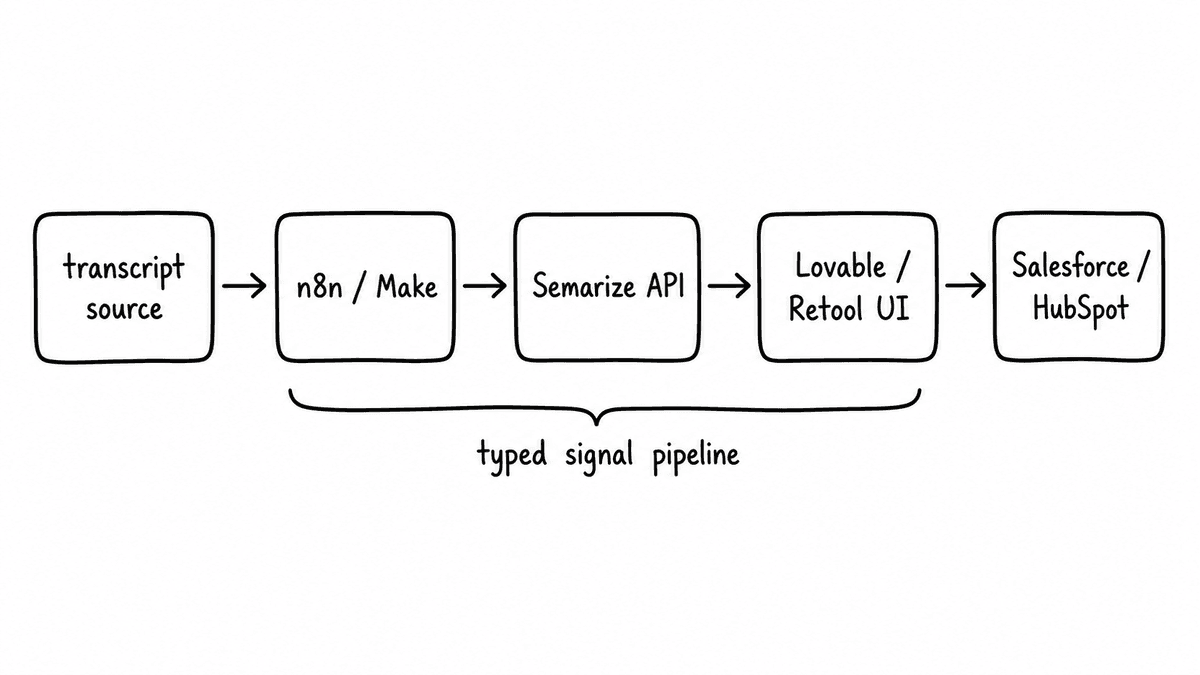
The stack rather than any single API: Zoom or Teams for transcription, n8n or Make for automation, Semarize for structured conversation signal, Lovable or v0 for the UI, Salesforce or HubSpot for CRM write-back. Most teams already have the transcription layer and the CRM. The gap is usually the automation wiring and the conversation intelligence layer in the middle.
Do I need a developer to build internal sales tools with these APIs?
For most of the stack, no. n8n and Make handle the automation layer without code. Lovable, v0, and Replit handle the UI layer with plain-English prompts. Semarize provides an MCP that lets you build evaluation schemas from inside a Claude or Codex conversation without writing config. A developer becomes useful when you need custom data transformations at scale or want to run the pipeline on managed infrastructure. A working first version is a realistic afternoon project for a technical RevOps manager.
Do I need a meeting bot API if I am already using Zoom or Teams?
No. Both platforms deliver transcripts via webhook when a recorded meeting ends, and the accuracy is good enough for a structured evaluation pipeline. Recall.ai is useful if you need consistent coverage across Zoom, Teams, Google Meet, and Webex from a single integration, or if you need bot presence without requiring the host to enable recording. For most internal tooling pipelines where you control the call platform, native transcription is the simpler path.
How do I get structured data out of sales calls automatically?
A Zoom or Teams webhook delivers the transcript when a call ends. An automation layer (n8n or Make) passes it to the Semarize API with a Kit code. Scored JSON comes back with typed fields and evidence quotes. The automation routes the outputs to whatever destination you need: CRM fields, a dashboard, a Slack alert. Define the evaluation schema once as a Kit and every call that runs through it returns the same typed fields indefinitely.
Can I use n8n or Make instead of writing custom integration code?
Yes, for most pipeline shapes. Both have HTTP modules that call any REST API without code. n8n's AI nodes handle JSON parsing and field mapping natively, and let you drop into JavaScript for anything more complex. Make is faster to set up for straightforward linear pipelines. Most teams building on this stack are running on n8n or Make rather than custom code.
Continue reading
Read more from Semarize
Conversation Intelligence for Developers: Don't Build a Fragile Pipeline, Don't Buy a Black Box
Most teams don't fail to add conversation intelligence because the model is bad; they fail because the integration is fragile and unstructured. The fix isn't a better LLM pipeline or a platform API you can't control. It's a layer that takes a transcript, runs it against a versioned Kit, and returns deterministic typed JSON you can test, version, and route into your product.
Gong Captures the Transcript. Here’s What It Can’t Score.
Gong’s scoring runs against a fixed model — you can’t attach your product documentation, rate card, or qualification playbook to its evaluation layer. For four evaluations that matter — product accuracy, pricing audit, methodology A/B testing, and deal readiness scoring — knowledge grounding and KB isolation are the only architecture that works.
Introducing the Semarize MCP
Today we're shipping the Semarize MCP. Connect Claude, Codex, or any MCP-compatible AI tool to your workspace and build evaluation schemas from inside a conversation: create Bricks, draft Kits, attach knowledge bases, and publish, without leaving the tool you're already working in.