
Where Vibe Coding Actually Makes Sense for Internal Teams
AI coding has moved faster than most of the discourse around it, and I think the people who are going to benefit most from it are not necessarily the ones that established software opinion would predict. I use AI coding tools every day, and I've stopped thinking about them as a shortcut to writing code. They are a way for people who deeply understand a problem to finally build the solution they've always wanted without waiting for someone else to prioritise it.
The conversation that is worth having now is not whether you can build with AI; increasingly you can, and more reliably every month. The question is where to direct the effort, because the things that reward this approach and the things that punish it are genuinely different, and that distinction matters.
Why the gatekeeping doesn't hold
The pushback from experienced engineers every time this comes up is predictable, and it is starting to feel like a position that has not kept pace with how fast the tools have actually moved. The examples are always the same: AI agents deleting production databases, systems collapsing under load, security nightmares. And they always describe the same situation: someone who gave full production access without environment separation, without security thinking, without any architectural awareness at all. That is not a description of what AI building does to you; it is a description of what skipping the fundamentals does to you in any context, with or without AI.
Those fundamentals still matter, but the path to them has shortened considerably. AI makes it significantly faster to understand what stable, secure architecture looks like, which corners should never be cut, and what separates a sensible environment setup from a naive one. The barriers are learnable, and they are getting lower faster than the critics are updating.
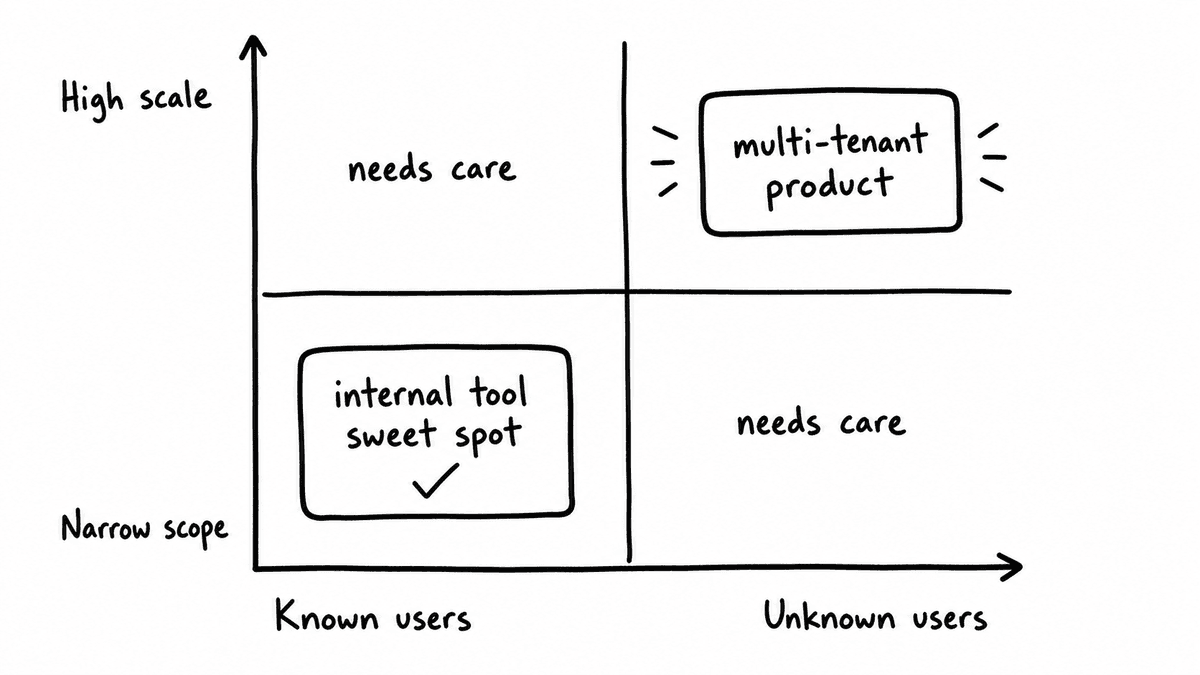
There is one place where the depth argument holds, and that is building external software for unknown users at scale: workspaces, multi-tenancy, billing, compliance, and user management across organisations that all configure their systems differently. In GTM platforms specifically, the complexity is real: you are not just accounting for different CRMs, but for the fact that different businesses configure the same CRM in entirely different ways, with different field mappings, different stages, and different custom objects. That is where experience earns its keep, and it is worth being honest about it.
But that argument does not apply to internal tools, and extending it there is what makes the gatekeeping unfair. A top-level app for users you know, doing jobs you can precisely verbalise, built on top of data that is already flowing, is a completely different problem. The scope is the constraint here, not the capability, and the person who already understands the data and the operational problem is often in a better position than most engineers to build the right thing.
The caveat I would add is a different one: you need opinion, taste, and a genuine understanding of user flows, needs, and expectations. AI-assisted building is currently weakest in generic, middle-of-the-road UX: it executes well on ideas and generates them poorly from scratch. Without a clear point of view to feed it, you end up with something competent and forgettable. The warning is not "you cannot build this" but "have something to say before you start," and for the person who has been living closest to the problem, that is usually not the issue.
Where BI falls short, and why it doesn't have to
The clearest example of this opportunity is existing BI. There is an illusion of relevance that comes with company data: it is your numbers, your pipeline, your metrics, so surely it must be telling you something useful. But relevance of data source is not the same as relevance of interface, and the views in most BI dashboards do not actually drive the onward progress of internal flows and initiatives, because they were not designed by someone who deeply understands what decisions are being made at which points and what would make those decisions faster and better.
The BI or RevOps person who has been living in that data for two years has a completely different relationship to it than a generic engineer building to a brief. They know which signals matter and which are noise, what the team actually asks about in Monday pipeline meetings versus what gets ignored, and what a useful view looks like against one that is technically complete but that no one reads. That contextual knowledge is exactly the raw material AI-assisted building needs to produce something genuinely useful: not just data access and prompting ability, but the opinion and taste to know what to do with both. Someone who can precisely verbalise what a user needs from an interface, because they are that user, is the right person to build it, and the brief that matters is the one already in their head.
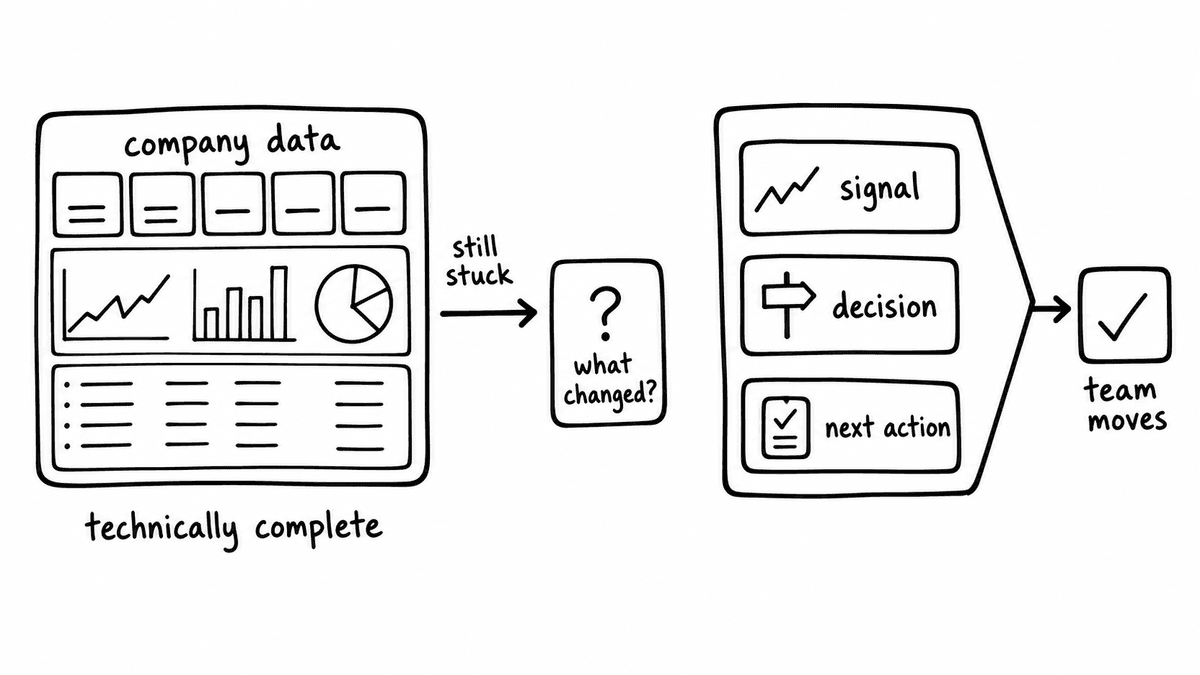
Revenue data is where I see this most clearly, and also where the constraint from vendor platforms is most acute. RevOps and sales leadership teams are routinely limited by what their CRM or BI platform can show natively, dependent on vendor roadmaps to go further. This is not an argument against CRM; the data in your CRM should stay there, and I'm a big believer in it. But the interface your team uses to interpret and act on that data doesn't need to live in Salesforce or HubSpot or Power BI if those interfaces are not giving you what you need. Get the data out via API or a warehouse connection, and the question of where it's displayed becomes completely open: you can design around the actual questions your team is trying to answer, filter and compute in ways the vendor UI doesn't support, and layer in signals from sources the CRM doesn't know about at all.
The data hiding in your conversations
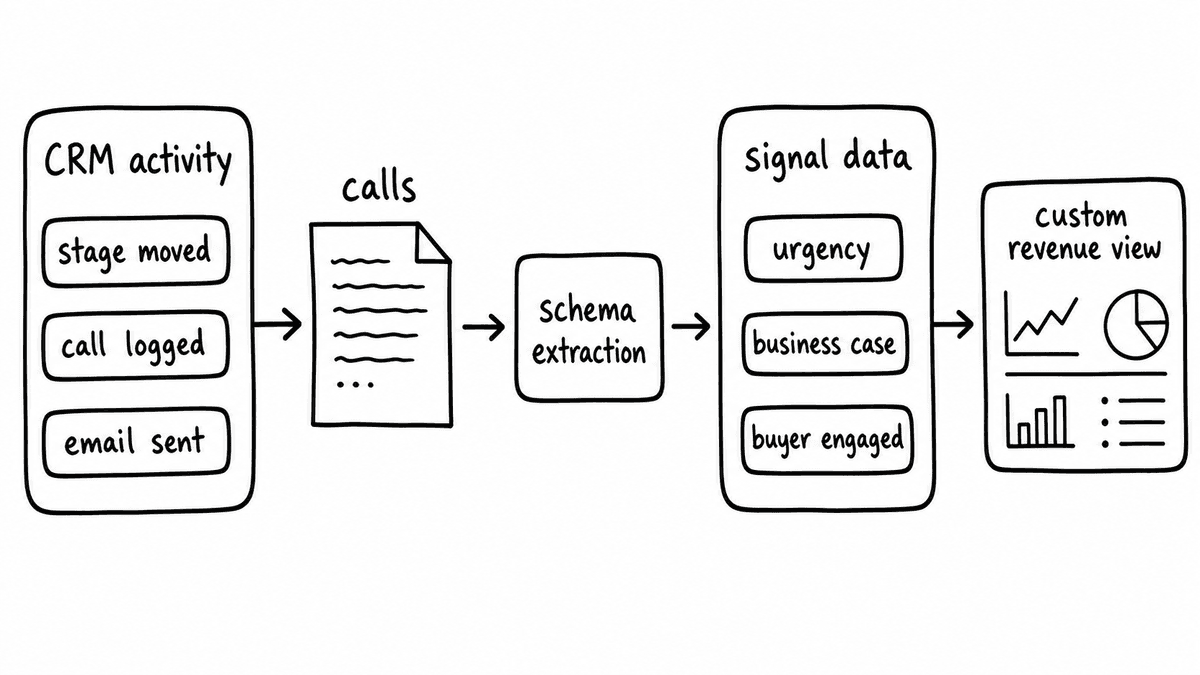
The moment a team starts building their own revenue view, they run into something that most eventually hit: the data they've recorded is ACTIVITY data, not signal data. Stage changes, meetings logged, emails sent. The things that actually tell you what's happening in a deal are sitting in your calls and conversations, not in your CRM fields: what the buyer said about urgency, whether there's a real business case, who on the buying committee has actually engaged. For most businesses, those signals are either not captured at all or locked inside a recording platform with no clean way to extract them.
This is the gap Semarize is built to close. Structured conversation intelligence produces typed, queryable signal data: JSON fields that record what happened on a call against a schema you define, returned in a format that flows directly into whatever reporting layer you're building. When that data lands in your dashboard alongside your CRM data, you end up with something no single vendor currently ships: a revenue view that shows pipeline health with buyer evidence underneath it, rep skill signals over time, and deal engagement indicators that update after every call and not just when a rep moves a stage. Because the dashboard is not stuck inside Salesforce or HubSpot, you have the flexibility to use that data in the way your business actually needs it rather than in whatever way the platform has decided to surface it.
The question everyone eventually asks
The pattern I keep seeing is this: a team gets the data flowing, the dashboard is built, and then the question becomes "OK, but what am I actually supposed to LEARN from this?" That question is harder than it sounds, and the gap between data on screen and a decision someone will actually act on is where most dashboards go to die. It is also the step that is REALLY hard to rely on vendors to solve for you; if the insight layer you need isn't on their roadmap, you're waiting on a timeline you don't control.
When you own the dashboard, that problem is fundamentally different. Adding the feature that answers the question is a small lift: you're not starting from scratch, you're not navigating a vendor's extension framework, and you're not waiting for approval on a roadmap item. You add the thing, test it against your data, and it's done. That compounding is, I think, the real case for building rather than buying in this category; not that the initial build is faster or cheaper, but that each improvement is cheap because you own the surface, and the direction of improvement is set by what your team actually needs rather than what a vendor has prioritised for their median customer.
Where this lands
The teams who are going to get the most from this are already doing some version of it: the BI analyst who has been maintaining the pipeline reports and quietly knowing they could tell a richer story, the RevOps generalist who has been asking for a better dashboard for years, the GTM engineer who knows exactly why the standard Salesforce view is missing half the picture. AI-assisted building gives those people the ability to build the interface they've always wanted without waiting for engineering time to exist. The scope constraint is real but it is shrinking, and the person closest to the problem is, increasingly, the best-qualified builder in the room.
And the data that makes those builds materially useful rather than just technically complete, the signal data that goes beyond activity records and captures what actually happened in your conversations, is exactly the problem Semarize is built to solve.
Semarize turns calls into structured, queryable signal data that internal dashboards can use directly: the buyer evidence, rep skill signals, and deal movement indicators that make a custom revenue view worth building.
Common questions
Do you need to be technical to vibe code something useful?
You don't need to write code, but you do need opinion, taste, and a genuine understanding of user flows and what decisions the tool needs to support. Where AI-assisted building is weakest is in generic, middle-of-the-road UX: without a clear point of view to feed it, the output tends towards something competent and forgettable. The advantage in internal tools is that the person closest to the problem, the BI analyst, the RevOps lead, the sales manager who uses the dashboard every day, usually has that point of view already. That is the raw material AI building needs to produce something genuinely useful.
What makes BI dashboards fail at actually driving decisions?
Usually it is the illusion of relevance: the data is your company's data, so it feels like it must be telling you something useful. But relevance of data source is not the same as relevance of interface. A dashboard designed around the median use case for a vendor's platform rather than around the specific decisions your team is trying to make will show a lot of information and help you make very few of them. The gap between data on screen and a decision someone will act on is bigger than most dashboard builders acknowledge when they start.
What tools would you actually recommend for this kind of build?
For the front-end, tools like Lovable, Bolt, Replit, and Base44 are all capable of producing working interactive dashboards with a reasonable prompting effort. For data connections and automation, Make and n8n handle the plumbing without requiring custom back-end code. The more important question is what data you're feeding in: structured conversation signal data alongside CRM data is what makes these dashboards materially different from a standard BI view. I'll cover the full build workflow in a follow-on post.
Where does conversation intelligence fit into a revenue dashboard?
Conversation intelligence, done properly, produces structured signal data: typed JSON fields that record what happened on a call, scored against a schema you define, ready to be joined to CRM records and queried alongside pipeline data. That closes the gap between what the CRM records and what the conversations actually revealed: pipeline health, buyer engagement, rep skill signals. A dashboard that can surface those alongside traditional metrics is materially more useful than one working only from activity data.
Is owning the dashboard the same as taking on a big maintenance burden?
There is a maintenance overhead, and it is worth being honest about it. A dashboard you build and own needs updating when the underlying data model changes and extending when the business asks new questions. For teams already doing this work in Power BI or Salesforce, that burden isn't new; it just shifts to a different surface. The trade-off is flexibility and compounding improvement over time: each addition is cheap because you own the code, and the direction of improvement is set by your team rather than a vendor roadmap.
Continue reading
Read more from Semarize
How to Vibe Code an Internal Sales Enablement Dashboard
Vibe coding tools have solved the frontend half of building an internal sales dashboard. The data half, turning call transcripts into typed, queryable fields, is what Semarize handles. This is how the two fit together: Kits and Bricks for the extraction layer, Lovable or Bolt for the interface.
Conversation Intelligence for Developers: Don't Build a Fragile Pipeline, Don't Buy a Black Box
Most teams don't fail to add conversation intelligence because the model is bad; they fail because the integration is fragile and unstructured. The fix isn't a better LLM pipeline or a platform API you can't control. It's a layer that takes a transcript, runs it against a versioned Kit, and returns deterministic typed JSON you can test, version, and route into your product.
The Best APIs for Building Internal Sales Tools in 2026
The GTM engineering stack for internal sales tooling is well settled in 2026. Here is what each layer looks like, which tools are worth building around, and what RevOps and enablement teams are actually assembling from them.