
How to Access Salesforce Conversation Data (ConversationEntry) via API
If you want to access Salesforce conversation data via API, the object you are almost certainly looking for is ConversationEntry, which stores the individual turns of a voice or messaging conversation captured through Einstein Conversation Insights, Service Cloud Voice, Sales Cloud Voice, and messaging channels. Salesforce exposes this data through the standard REST API and SOQL, and for teams that need it moving in near real time, through Change Data Capture on the relevant conversation objects. What none of those endpoints give you is a structured business signal: they return the raw content and metadata of the conversation, and turning that into typed fields your team can query is a separate step.
This guide covers how to access conversation entries in Salesforce: what theConversationEntry object and its related records represent, how to query them with REST and SOQL, the permissions and feature enablement you need first, how Change Data Capture keeps a downstream system current, and how to convert the conversation text into typed JSON that writes back onto the Opportunity so RevOps can filter, report, and automate on it.
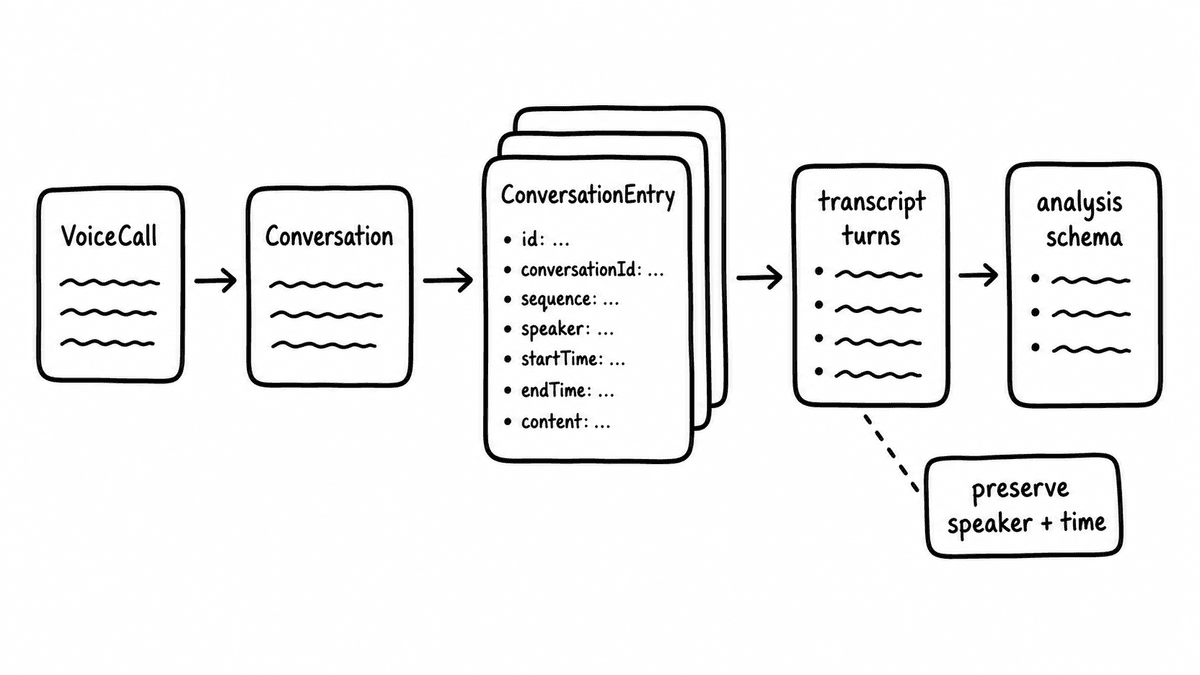
What the ConversationEntry object in Salesforce represents
Conversation data in Salesforce is modelled as a small family of related objects rather than a single flat record. Individual entries, the turns of a call or messaging thread, are stored on ConversationEntry, and each row typically holds the message or utterance content, a sender reference, an identifier tying it to the parent conversation, and timestamps for sequencing. The parent conversation and its participants live on related objects, so a single call or chat is reconstructed by joining a set of entry rows back to the conversation they belong to. The exact field names and object relationships vary by edition and by which features are enabled in your org, so treat the shape described here as the pattern rather than a fixed schema and confirm the details against your own org’s object reference.
The important characteristic for anyone building on this data is that entries store content and metadata rather than interpretation, because entries tell you what was said and by whom and when, but they don’t tell you whether the buyer named a competitor, whether next steps were agreed, or how strong discovery was on any given call. Those are the signals RevOps and sales leaders actually want, and they have to be derived from the entry text after you’ve queried it.
How to query Salesforce conversation data via API
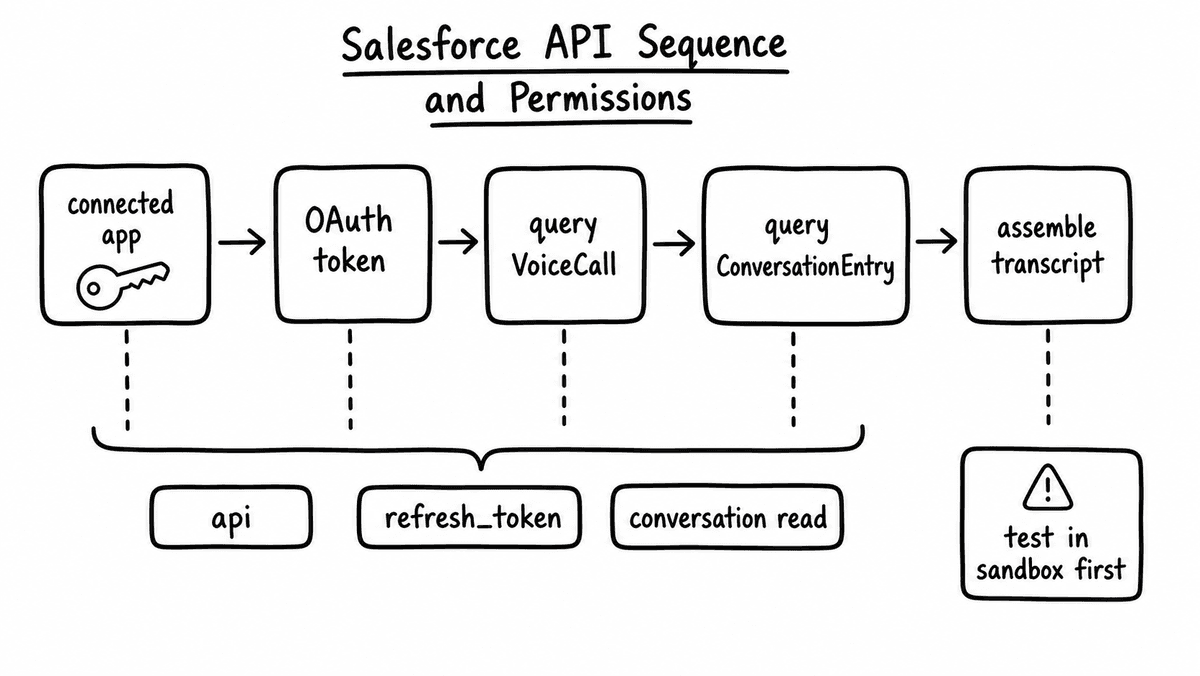
Conversation entries are queried the same way as any other Salesforce object, through the REST API query endpoint with a SOQL statement. A typical request sends a GET to /services/data/vXX.X/query with a SOQL string that selects the fields you need from ConversationEntry and filters by the parent conversation identifier or a time window. Because a single conversation spans many entry rows, most integrations query all entries for a given conversation, order them by their timestamp, and concatenate the content into one transcript before doing anything downstream with it.
For high-volume backfill, the Bulk API handles large result sets more gracefully than the standard query endpoint, and it is the right choice when you are processing an existing archive of conversations during onboarding rather than a steady trickle of new ones. The REST query endpoint remains the simplest path for incremental work: poll for entries created since your last run, group them by conversation, and hand each completed transcript to whatever processes it next. Authentication uses the standard Salesforce OAuth flows with a connected app, and the querying identity needs the object-level read access described below before any of these queries return rows.
Permissions and feature enablement you need first
Conversation objects are gated behind both feature enablement and object permissions, so a query that looks correct will return nothing if either is missing. The underlying capability comes from the relevant conversation feature being switched on in the org: Einstein Conversation Insights, Service Cloud Voice or Sales Cloud Voice, or the messaging channels that generate the entries in the first place. Without the feature enabled, the objects may not be populated, or in some configurations may not be visible at all, and the specifics of which feature surfaces which object differ by edition and setup.
On top of feature enablement, the integration user or connected app needs read access to the conversation objects through its profile or a permission set. Salesforce ships permissions along the lines of an “access conversation entries” grant that controls visibility of this data, and the exact permission label and the object-level settings depend on your org and the features you have enabled, so the reliable approach is to grant read on the conversation objects in a dedicated permission set and confirm the query returns rows in a sandbox before wiring anything to production. Provisioning a dedicated integration user for this, rather than reusing a person’s login, keeps the access auditable and stable as staff change.
Change Data Capture for near-real-time conversation data
Polling the query endpoint is fine for batch work, but teams that want conversation signals to land while a deal is still live use Change Data Capture instead, which is why “ConversationEntry change data capture” shows up as a search people run. Change Data Capture publishes an event whenever a record on a subscribed object is created or updated, so subscribing to the conversation objects lets a downstream system react to new entries as they arrive rather than discovering them on the next poll. The subscriber receives the changed fields and the record identifier, and from there it can pull the full set of entries for that conversation and process the completed transcript.
Change Data Capture has to be enabled per object in setup, and not every object is eligible, so confirm that the conversation objects you care about can be selected in your org before designing around it. The pattern that holds up in production is to use Change Data Capture as the trigger and a REST query as the fetch: the event tells you a conversation has changed, and the query assembles the entries into the transcript you actually want to work with, which keeps the event payload small while still giving the downstream step the full content.
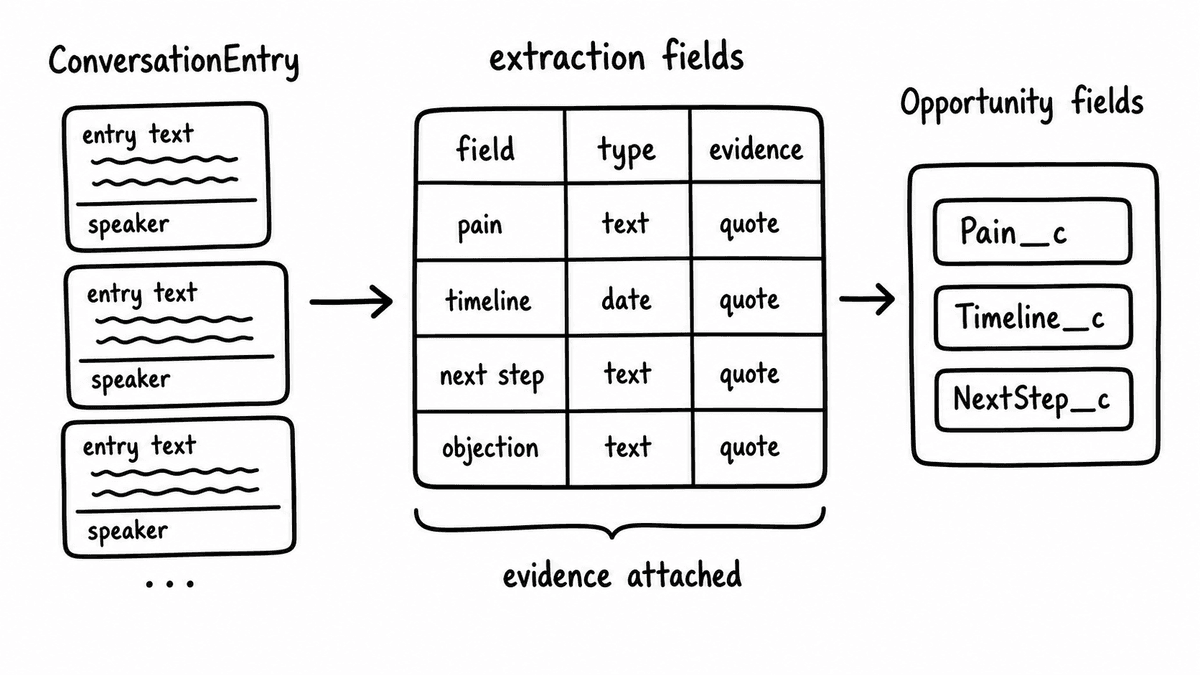
From raw conversation entries to structured CRM fields
Once you have queried the entries and assembled a transcript, you have exactly what the Salesforce API can give you and nothing more: readable conversation text. Turning that text into fields RevOps can query means running it through an evaluation layer that returns typed values, and this is where Semarize sits in the flow. You send the assembled transcript to the Semarize API with a Kit that defines the schema, and each Brick in that Kit evaluates one criterion and returns a typed result: a boolean for whether the economic buyer was named, a score for discovery quality, a category for call disposition, or an extracted string for any competitor mentioned. The response is a JSON object with one field per Brick, ready to be written back to Salesforce.
Writing those values back is a PATCH to the Opportunity object, or to a custom object built to hold call-level signals, using the field API names that match each Brick output. Boolean Bricks map to checkbox fields, score Bricks to number fields on the same scale, and category Bricks to picklists with matching values, so when the Kit schema is designed against the target fields the write step needs no transformation. The result is that conversation data which started as rows on ConversationEntry ends up as typed columns on the deal, where a pipeline report can filter on them and a flow can trigger off them. The CRM enrichment playbook covers the field-mapping and write-back patterns for Salesforce and HubSpot in more detail, and the transcripts to CRM-ready JSON post walks through the same transcript-to-typed-output step from any source.
Where Salesforce ends and the signal layer begins
The division of labour is clean once you see it: Salesforce captures and stores the conversation and exposes it through REST, SOQL, and Change Data Capture, and Semarize turns the content of that conversation into the typed signals your team wants to act on. Neither replaces the other, because the API access gives you the raw material and the evaluation layer gives you the queryable fields, and the two together are what let a call captured on ConversationEntry change what a forecast report shows without a rep typing anything into a notes field. Because Semarize takes transcript text and returns JSON, the same pipeline works whether the conversation originated in Salesforce Voice, a messaging channel, or a recording platform outside Salesforce entirely.
Semarize turns Salesforce conversation data into typed JSON your Opportunity records, reports, and automations can use directly.
Common questions
What is the ConversationEntry object in Salesforce?
ConversationEntry is the Salesforce object that stores the individual turns of a voice or messaging conversation captured through features such as Einstein Conversation Insights, Service Cloud Voice, Sales Cloud Voice, and messaging channels. Each row typically holds the message or utterance content, a sender reference, a link to the parent conversation, and timestamps for ordering, so a full call or chat is reconstructed by joining many entry rows back to their conversation. Entries store content and metadata rather than interpretation, so they tell you what was said and by whom, not whether a business criterion was met. Exact fields vary by edition and enabled features.
How do I query Salesforce conversation data via API?
Query conversation entries the same way as any Salesforce object, through the REST API query endpoint with a SOQL statement that selects fields from ConversationEntry and filters by the parent conversation identifier or a time window. Because one conversation spans many entry rows, most integrations pull all entries for a conversation, order them by timestamp, and concatenate the content into a single transcript. For large backfills the Bulk API handles big result sets better, and the querying identity needs read access to the conversation objects and the relevant feature enabled before any rows are returned.
What permission do I need to access conversation entries?
You need two things: the underlying conversation feature enabled in the org, such as Einstein Conversation Insights, Service or Sales Cloud Voice, or messaging, and object-level read access to the conversation objects granted through a profile or permission set. Salesforce ships a permission along the lines of an access conversation entries grant that controls visibility of this data, and the exact label and object settings depend on your org and enabled features. The reliable approach is to grant read on the conversation objects in a dedicated permission set, assign it to an integration user, and confirm a query returns rows in a sandbox first.
How do I turn Salesforce conversation data into structured CRM fields?
Query the conversation entries, assemble them into a transcript, and send that transcript to an evaluation layer that returns typed values. With Semarize you send the transcript to the API with a Kit that defines the schema, and each Brick returns one typed result: a boolean, a score, a category, or an extracted string. The response is a JSON object with one field per Brick, which you write back to the Opportunity or a custom object with a PATCH using the matching field API names. Conversation content that started as ConversationEntry rows then becomes typed columns that reports can filter and flows can trigger on.
Continue reading
Read more from Semarize
CRM Enrichment From Sales Calls: The RevOps Data Ops Playbook
Most CRM enrichment stalls at 30% field coverage because the output is unstructured - reps updating from memory, summaries stored as notes. The fix is a structured extraction pipeline: transcript to consistent fields to CRM to automation triggers. This playbook covers the schema, the routing, and the implementation in Salesforce and HubSpot.
Turn Sales Call Transcripts Into CRM-Ready JSON: Schema, Extraction, Validation, and Scoring
The gap between a call transcript and a CRM opportunity record is a schema design problem. Define the fields, extract them from the transcript with typed criteria, validate the output, and write it to the CRM. Every source works. No rep data entry required.
CRM Field Extraction From Sales Calls: Brick-Based, Validated, Webhooked
Most conversation intelligence programmes fail at CRM enrichment not because the model is wrong but because fields get filled with summaries instead of typed evidence. A Brick-based extraction contract, a validation gate, and webhook-driven automation fix each part of that in sequence.